
File storage
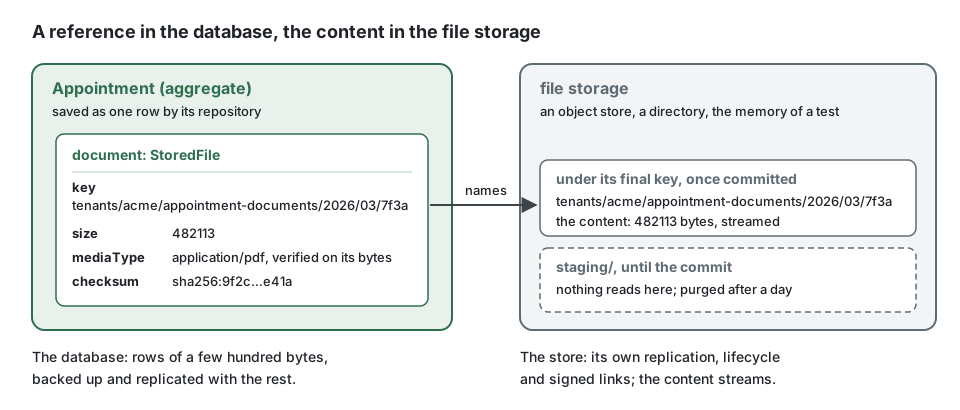
Summary. A file (a scan, a photo, a signed contract, an export) is kept in a file storage,
never in the database: an object store in a deployment, a directory while developing, the
memory of the process in the tests. The aggregate keeps only a reference, a StoredFile (key,
size, media type, checksum). A write to the storage cannot join a transaction, so the kit fixes
an order that keeps both consistent: the file is staged where nothing reads it, before the
transaction opens; the reference is recorded in the transaction, and the file is moved to its
key as the last step of that transaction, back if it rolls back. A committed row never points to
a staged file, so a scheduled job purges every staged file older than a day. Keys are generated
on the server, links are signed and short, and the content is checked on its bytes as it
streams.
Why never in the database
Section titled “Why never in the database”A column of bytes looks simple: one transaction, one backup, one place. It costs more than it saves.
| In the database | In a file storage |
|---|---|
| the whole file goes through the memory of the application and of the database at each read | the content streams, a part at a time |
| every backup, replica, dump and restore carries every file | the rows stay small; the store has its own replication and lifecycle |
| a download goes through the application, its threads and its connection pool | a signed link sends the client to the store, or to a route that streams |
| a few large rows slow the scans of the table they share pages with | the table holds references only |
| erasing a file means rewriting rows and vacuuming | a key is deleted, a lifecycle rule expires a prefix |
persistence/no-file-content reports a binary column (bytea, blob, varbinary, knex
.binary(), a Prisma Bytes field) or a base64 column in a schema or a migration. A small
binary value that is not a file, a hash or a key, is a deviation recorded with its reason.
import type { Knex } from 'knex';
// Instead of: the content in a column, read and written wholeexport async function withContent(knex: Knex): Promise<void> {  await knex.schema.createTable('appointment_documents', (table) => {    table.string('id').primary();    table.binary('content'); // reported by persistence/no-file-content  });}
// Write: the four fields of the StoredFile, a few hundred bytes per rowexport async function withReference(knex: Knex): Promise<void> {  await knex.schema.createTable('appointment_documents', (table) => {    table.string('id').primary();    table.string('file_key').notNullable();    table.bigInteger('file_size').notNullable();    table.string('file_media_type').notNullable();    table.string('file_checksum').notNullable();  });}
The ports
Section titled “The ports”| Port | What it is |
|---|---|
FileStorage |
the store: put (a stream in, measured and hashed, refused beyond maxBytes), get (a stream out), stat, delete, copy, move, list(prefix), signedDownloadUrl, signedUploadUrl |
StoredFile |
what an aggregate keeps: key, size, mediaType, checksum; never the provider, the bucket or a URL |
FileKeys |
names files on the server: tenants/<tenant>/<area>/<year>/<month>/<id> |
FileScanner |
the check a file passes before it is accepted: an antivirus, a parser, a policy on archives |
FileStaging |
the order of a write: stage and scan, promote with the commit, delete after it, purge |
FileUpload |
the file a command carries: received from the client, staged by the bus before the transaction |
The domain and the use cases name these ports and nothing else (files/port-not-connector):
the platform binds the connector of each environment (stack.storage in
CONFIG.md). The connectors and how they compare are in
tools/file-storage.md.
In the platform, the files are one capability: the storage of the environment, the ports bound
to the implementations of the kernel, and the hourly purge. On the container of the kit, init
writes it as below, in src/platform/files/ (files.module.ts and bind-files.ts, here in
one piece); wired by hand, create-files.ts builds the same objects:
import { defineContextModule, type ContextModule } from '@ddd-ts-kit/di';import {  AcceptEveryFileScanner,  Clock,  ErrorReporter,  ExecutionScope,  FileKeys,  FileScanner,  FileStaging,  FileStorage,  IdGenerator,  PurgeStagedFiles,  TenantFileKeys,} from '@ddd-ts-kit/kernel';
export function filesModule(storage: FileStorage): ContextModule {  return defineContextModule({    name: 'files',    register(builder) {      // the connector main.ts opened for this environment: S3, a directory, the memory      builder.bind(FileStorage).toValue(storage);      // replace it with an antivirus before accepting files from people you do not know      builder.bind(FileScanner).toValue(new AcceptEveryFileScanner());      builder        .bind(FileKeys)        .toFactory((resolve) => new TenantFileKeys(resolve(IdGenerator), resolve(Clock), resolve(ExecutionScope)));      builder        .bind(FileStaging)        .toFactory((resolve) => new FileStaging(resolve(FileStorage), resolve(FileScanner), resolve(ErrorReporter)));      // every hour, the staged files older than a day are removed      builder.job('files.purge-staged', { every: '1h' }).handledBy(PurgeStagedFiles, [FileStaging, Clock]);    },  });}
Receiving a file
Section titled “Receiving a file”A controller declares the file it receives, and the declaration is the contract: the field, the
most it may weigh and the media types it may be. The OpenAPI document states them
(multipart/form-data, x-max-bytes, x-media-types) with the 413, 415 and 422 refusals.
import { definePermissions } from '@ddd-ts-kit/auth';import {  acceptedSchema,  Authenticated,  Controller,  RouteGroup,  type Accepted,  type HttpRequest,  type IncomingFile,} from '@ddd-ts-kit/http';import { AuthorizedCommand, FileUpload, type Actor, type CommandBus, type ReceivedFile } from '@ddd-ts-kit/kernel';import { Requires } from '@ddd-ts-kit/kernel/declarations';import { zodSchema } from '@ddd-ts-kit/validation/zod';import { z } from 'zod';
const permissions = definePermissions('scheduling', {  'appointment.attach-document': { description: 'Attach a document to an appointment' },});
// application: the command carries the file, wrapped in a FileUpload of its area@Requires(permissions['appointment.attach-document'])export class AttachDocumentCommand extends AuthorizedCommand<string> {  readonly document: FileUpload;
  constructor(    actor: Actor,    readonly appointmentId: string,    file: ReceivedFile,  ) {    super(actor);    this.document = new FileUpload(file, 'appointment-documents');  }}
// presentation: the route declares the file it accepts, and that declaration is the contract@RouteGroup({ prefix: '/appointments', tags: ['scheduling'], guards: [Authenticated] })export class AppointmentRoutes {}
const params = zodSchema(z.object({ appointmentId: z.string() }));
@Controller({  group: AppointmentRoutes,  method: 'POST',  path: '/:appointmentId/document',  summary: 'Attach a document',  params,  upload: { field: 'document', maxBytes: 10_485_760, mediaTypes: ['application/pdf', 'image/png', 'image/jpeg'] },  response: { status: 201, description: 'Attached.', body: acceptedSchema },  errors: ['APPOINTMENT_NOT_FOUND', 'FILE_REJECTED'],})export class AttachDocumentController {  constructor(private readonly commands: CommandBus) {}
  async handle({ params, actor, upload }: HttpRequest<{ params: { appointmentId: string }; upload: IncomingFile }>): Promise<Accepted> {    await this.commands.execute(new AttachDocumentCommand(actor, params.appointmentId, upload));
    return { id: params.appointmentId };  }}
The file reaches handle while it still streams, and handle hands it to the command, which
wraps it in a FileUpload of its area (new FileUpload(file, 'appointment-documents')). The
fileUploadsMiddleware of the command bus stages it there, after the permission check and
before the unit of work: a refused actor stores nothing, and no transaction, no pooled
connection, waits while a client uploads ten megabytes over a slow link. The handler reads
command.document.file, a StoredFile already staged and scanned. On its way the file is
counted and refused with
FILE_TOO_LARGE beyond its limit; its first bytes must prove the media type the client
declared, and that type must be accepted, or it is refused with UNSUPPORTED_MEDIA_TYPE, before
a byte reaches the storage. A PDF starts with %PDF-; a Word or Excel document is a zip
archive; text is UTF-8 without control characters; SVG and the binary formats the kit does not
recognise never pass, since a name or a declared type proves nothing.
The handler therefore never sees bytes. It records the reference and asks for the promotion:
import { AuthorizedCommand, ConceptError, type Clock, type FileStaging, type FileUpload, type StoredFile } from '@ddd-ts-kit/kernel';import { CommandHandler } from '@ddd-ts-kit/kernel/declarations';
declare class AttachDocumentCommand extends AuthorizedCommand<string> {  readonly appointmentId: string;  readonly document: FileUpload;}
declare class Appointment {  /** Keeps the reference of the new document; answers the one it replaces, if any. */  attachDocument(file: StoredFile, name: string, now: Date): StoredFile | undefined;}
declare abstract class AppointmentRepository {  abstract findById(id: string): Promise<Appointment | undefined>;  abstract save(appointment: Appointment): Promise<void>;}
class AppointmentError extends ConceptError {  static notFound(appointmentId: string) {    return AppointmentError.refusal('APPOINTMENT_NOT_FOUND', `Appointment ${appointmentId} does not exist.`, { appointmentId });  }}
@CommandHandler(AttachDocumentCommand)export class AttachDocumentHandler implements CommandHandler<AttachDocumentCommand> {  constructor(    private readonly appointments: AppointmentRepository,    private readonly staging: FileStaging,    private readonly clock: Clock,  ) {}
  async execute(command: AttachDocumentCommand): Promise<string> {    const appointment = await this.appointments.findById(command.appointmentId);
    if (appointment === undefined) {      throw AppointmentError.notFound(command.appointmentId);    }
    // staged and scanned by the bus already: a key, a size, a verified type, a checksum    const { file, fileName } = command.document;    const replaced = appointment.attachDocument(file, fileName, this.clock.now());
    await this.appointments.save(appointment);    // the file moves from staging/ to its key as the last step of this transaction    await this.staging.promoteOnCommit(file.key);
    if (replaced !== undefined) {      // the old file goes once the commit is certain; a crash here only leaves an orphan      await this.staging.deleteAfterCommit(replaced.key);    }
    return file.key;  }}
The example application holds this use case end to end, with a spec that commits and rolls back
against a real database and a real directory:
attach-appointment-document
and
document-lands-with-its-file.spec.ts.
For a large file, the client sends it straight to the store. A first command generates the key
and signs an upload link for it (FileStaging.uploadUrl(key, { expiresInSeconds, mediaType, accepted, maxBytes })); it hands the link to the client and records the pending grant (key,
size cap, media types) on the aggregate that awaits the file. The client sends the file to the
link. A second command, which names the aggregate and never a key, reads the grant back from it
and confirms (FileStaging.confirm(pending)): what arrived is measured against the cap of the
grant, checked on its bytes and scanned, then recorded and promoted like any staged file. A
client can neither choose the key it confirms nor raise the cap. The links of the local and
memory storages refuse a larger upload themselves; a presigned link of an object store cannot
cap the size, so the confirmation is what holds it.
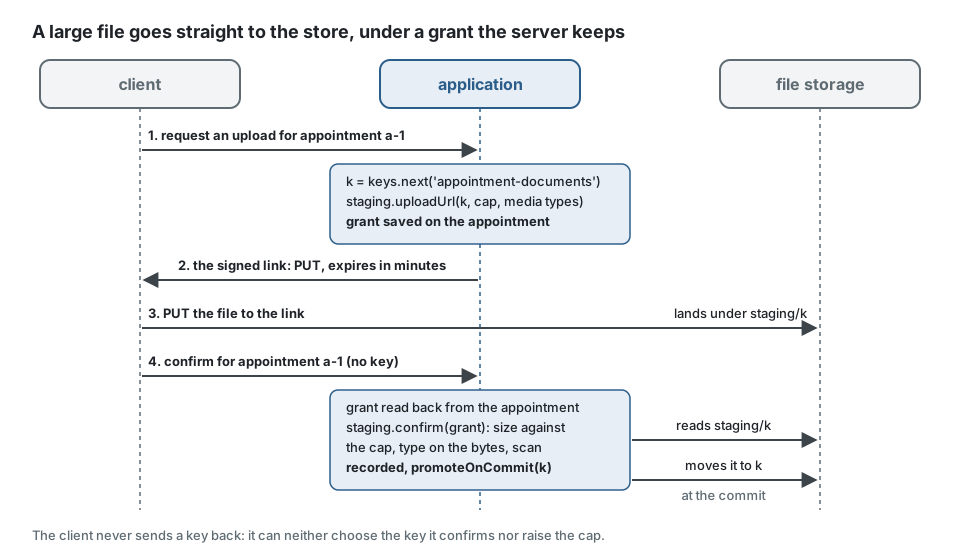
The two commands, reduced to what they do with the files:
import { ConceptError, type FileKeys, type FileStaging, type PendingUpload, type SignedUpload, type StoredFile } from '@ddd-ts-kit/kernel';
declare class AppointmentError extends ConceptError {  static noUploadAwaited(): AppointmentError;}
declare class Appointment {  /** Records the grant: the key, the cap and the media types the server accepted to sign. */  awaitDocument(pending: PendingUpload): void;  /** The grant recorded by the first command; `undefined` when no upload is awaited. */  readonly awaitedDocument: PendingUpload | undefined;  attachDocument(file: StoredFile, now: Date): void;}
const TEN_MINUTES = 600;const TWO_HUNDRED_MEGABYTES = 200_000_000;
// 1. The first command: a key generated here, a link for the client, the grant for the aggregate.export async function offerUpload(keys: FileKeys, staging: FileStaging, appointment: Appointment): Promise<SignedUpload> {  const { link, pending } = await staging.uploadUrl(keys.next('appointment-documents'), {    expiresInSeconds: TEN_MINUTES,    mediaType: 'application/pdf',    accepted: ['application/pdf'],    maxBytes: TWO_HUNDRED_MEGABYTES,  });
  appointment.awaitDocument(pending); // saved with the appointment, never sent to the client
  return link; // url, method PUT, headers to send as they are, expiresAt}
// 2. The second command names the appointment, never a key: the grant comes from the server.export async function confirmUpload(staging: FileStaging, appointment: Appointment, now: Date): Promise<StoredFile> {  const pending = appointment.awaitedDocument;
  if (pending === undefined) {    throw AppointmentError.noUploadAwaited();  }
  const file = await staging.confirm(pending); // measured against the cap, checked on its bytes, scanned
  appointment.attachDocument(file, now);  await staging.promoteOnCommit(file.key);
  return file;}
Keeping the store and the database consistent
Section titled “Keeping the store and the database consistent”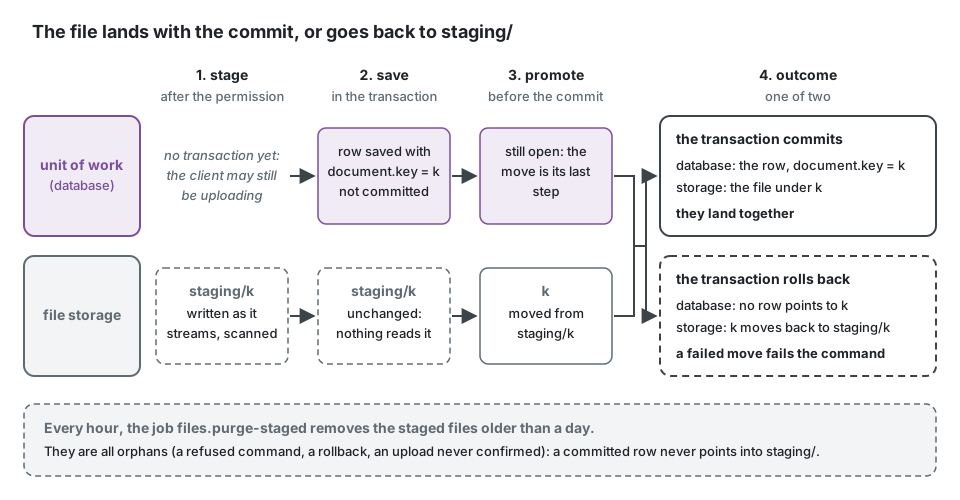
The aggregate holds the final key from the start, and the file reaches it inside the
transaction that records it: a promotion that fails (the storage is away) fails the command, so
no row commits that points to a missing file, and a commit that fails after the promotion moves
the file back to staging/. A committed row therefore never points into staging/, and every
staged file is an orphan: a refused command, a rollback, an upload never confirmed. The purge
removes them by age without asking the database anything. No key generated by FileKeys or
accepted by FileStaging starts with staging/.
afterCommit, which runs at most once after the commit, is kept for what may be lost: deleting
the file an aggregate no longer references (FileStaging.deleteAfterCommit). A crash there
leaves an unreferenced file, storage spent and never data lost.
Serving a file
Section titled “Serving a file”A download goes through a signed link: signedDownloadUrl(key, { expiresInSeconds, fileName })
answers a URL that grants this file, as an attachment, until it expires (at most an hour; five
minutes is enough for a click). An object store answers its own links. The local directory and
the memory connector are answered by the application itself, signedFileRoutes of
@ddd-ts-kit/http under /files, public since the token is the grant, with nosniff and
no-store.
import type { FileStorage, StoredFile } from '@ddd-ts-kit/kernel';
/** Five minutes: long enough for a click, short enough that a link copied into a mail soon grants nothing. */const LINK_SECONDS = 300;
export interface DocumentLink {  readonly url: string;  readonly expiresAt: Date;  readonly name: string;}
// in the handler of the query, once the appointment is loaded and the permission grantedexport async function linkToDocument(files: FileStorage, file: StoredFile, name: string): Promise<DocumentLink> {  const link = await files.signedDownloadUrl(file.key, { expiresInSeconds: LINK_SECONDS, fileName: name });
  return { url: link.url, expiresAt: link.expiresAt, name };}
The use case that signs the link is a query with its permission like any other. When the files
hold personal data, its permission is declared sensitive (sensitivePermissions of
auditDecisions in @ddd-ts-kit/audit): every access is then recorded in the audit trail, by
whom, on which resource, under which correlation, without the content or the link.
Security
Section titled “Security”- No path from the user. The key comes from
FileKeys, never from a file name: a request cannot choose where it writes, climb out of a directory (../) or guess another key. The connectors refuse any key that is not segments of letters, digits,.,-and_, none starting with a dot. A direct upload is confirmed from the grant the server kept, never from a key the client sends back. - One prefix per tenant. In a multi-tenant project the key starts with
tenants/<tenant>/, so a bucket policy, an export or an erasure addresses a tenant by prefix. The tenant id is the segment itself: the kernel accepts no other than letters, digits,-and_(see Multitenancy), so two tenants never share a prefix. - Short links. A signed link is a bearer token: it leaks with the page, the log or the mail that holds it. The kit refuses one that lives more than an hour.
- Checked on the bytes, scanned before acceptance.
FileScannerruns on the staged file; a refused file is removed and never visible. - The file name is data. It is shown back to people, escaped in
Content-Disposition, and never used to decide anything.
The first and the last rule, side by side:
import type { FileKeys, ReceivedFile } from '@ddd-ts-kit/kernel';
declare const keys: FileKeys;declare const received: ReceivedFile;
// Instead of: a key built from what the client sent ("../../config.json", two "scan.pdf" that overwrite each other)const unsafe = `documents/${received.fileName}`;
// Write: a key generated on the server, under the tenant, never guessableconst key = keys.next('appointment-documents'); // tenants/acme/appointment-documents/2026/03/<id>
Import and export in the background
Section titled “Import and export in the background”Importing a spreadsheet of ten thousand rows, validating each row, writing an error report and
resuming after a crash is work for the job queue: one background job per
file, retried, observable, with its progress and its checkpoint kept. The kit does not ship this
processing yet; File import and export is its design, on the pieces
that exist: the file arrives through an upload and is staged and scanned like any other, a
reader of the stream yields rows without holding the file, the error report is itself a file
written with put and offered through a signed link, an export is written in parts with put.
Until it is built, a command that validates a small file inline, or a background job written by
hand on these ports, is the honest way.
Limits
Section titled “Limits”- A write to a storage is never part of a transaction: the order above is the only guarantee.
A crash after the promotion and before the commit leaves a file under its final key that no
row references: storage spent, never data lost. A commit whose outcome the database does not
report (the connection drops during
COMMIT) is taken for a rollback: the file goes back tostaging/, where it stays a day before the purge. - The promotion runs inside the transaction: a rename on the local directory, a server-side copy then a delete on S3, which for a large object holds the transaction a few seconds.
- The file is staged before the handler runs: a command refused by its handler (an unknown
appointment, a rule of the aggregate) still received the file, which waits in
staging/for the purge. The time a client takes to upload is bounded by the timeouts of the HTTP server, not by the database. - The local directory serves one machine: several instances of an application need an object store.
copyandmoveon S3 go throughCopyObject, 5 GiB per object.- The S3 connector does not keep the checksum in the bucket:
putanswers it, the aggregate keeps it. - Media types are recognised from a short list of signatures (PDF, PNG, JPEG, GIF, WebP, zip and the office formats, gzip) and from text: another binary format needs a check of its own.
See also
Section titled “See also”- File import and export: the design of the processing in the background.
- Connectors of the file storage: memory, local, S3 compatible, and how to write one for Google Cloud Storage or Azure.
- Audit trail: recording the access to files that hold personal data.
- Scheduled jobs: the purge of staged files.
- Transactional outbox: the same dual write problem, for events.