
Parallel work without collisions
Summary. Several people, or several coding agents, can build one project at the same time if the work is sliced along the two seams the architecture already has: the bounded context and the vertical use case. Almost everything inside a context is private to it and safe to write in parallel. A short list of files is shared by construction (the config, the generated barrels and documents, the composition root, the migrations, the published language of an upstream) and must be changed in sequence. This guide lists both, explains worktrees, merge order and who regenerates what, and ends with a concrete plan: four contexts of a scheduling application built by four workers after a shared bootstrap.
Two ways to slice
Section titled “Two ways to slice”By bounded context. One worker, one context. The closed tree puts everything a context
needs under src/contexts/<context>/, and the rules forbid reaching into another context
except through its published language. Two workers in two contexts therefore edit disjoint
directories.
By vertical use case, inside a context. One command or query, end to end: its folder under
application/commands/ or application/queries/, its route, its specs. Two use cases of one
context share the aggregate file and the context's generated barrel, so they conflict more
often than two contexts do. Parallelise inside a context only after the aggregate's shape has
settled.
Do not slice by layer ("you write the domain, I write the handlers"): each half is untestable until the other exists, and the two meet in every file.
What is safe in parallel, and what must be sequenced
Section titled “What is safe in parallel, and what must be sequenced”| File or area | Written by | Parallel? | How to handle |
|---|---|---|---|
src/contexts/<A>/** and src/contexts/<B>/** |
different workers | yes | disjoint by construction |
| two use case folders of one context | different workers | mostly | they meet in the aggregate, the barrel and the routes file: merge often |
ddd-ts-kit.config.json |
init, generate context, generate service, generate worker, generate adr --deviation |
no | create all contexts and relationships in the bootstrap; later changes one at a time, by the platform owner |
src/platform/compose-application.ts, src/platform/platform.module.ts, src/platform/platform-test.module.ts |
generate context (the composition root), generate gateway (the two modules, in the declared style), hand edits |
no | registration regions are written between markers; two branches adding a context both touch them |
the registries of the platform: src/platform/database/schema.ts (with Prisma, prisma/schema.prisma), src/platform/auth/permissions.ts, src/platform/auth/role.ts, src/platform/auth/access-policies.ts (explicit style), src/platform/audit/audited-events.ts, src/platform/job-settings.ts, the grants under src/platform/auth/, and the helper src/platform/resilience/own-policy.ts |
generate context, generate repository (the first of a context; every one with Prisma), generate command --aggregate on an aggregate that has no repository yet, generate route-group --role with a new role, generate policy (explicit style), generate integration-event, generate job, generate adapter (the first of a project wired on tsyringe) |
no | run these generators on the trunk before the workers start; generate --help --json says which kinds write shared files (writesShared) and which ones |
src/main.ts |
hand edits | no | the platform owner |
test/architecture/extractable.spec.ts, knip.json (the first context) |
init, generate context |
no | same: written with each context |
<context>.declarations.ts (the barrel, with what each constructor is injected), <context>.dependencies.ts under discovery |
every generate in that context, docs, and npm run dev |
per context | derived: never merge by hand, regenerate (below) |
docs/context-map.md, the generated lists of each CONTEXT.md |
ddd-ts-kit docs, every generate |
no, but cheap | derived: regenerate after merging |
openapi/*.yaml, docs/integration/asyncapi.yaml, docs/integration/event-catalog.md |
npm run docs:generate |
no, but cheap | derived and deterministic: regenerate after merging |
.dependency-cruiser.cjs |
depcruise-config --write, generate context |
no, but cheap | derived from the config: regenerate |
| database migrations | the ORM's tooling | no | one schema per context keeps tables apart, but the migration sequence is one list: number at merge time |
the published-language/ of an upstream |
the upstream's owner, and generate gateway run for a consumer (the read contract) |
no for its consumers | merge the contract first; consumers branch from it |
src/shared-kernel/ |
co-owners | no | rare by design; one change at a time |
package.json, the lockfile |
anyone adding a dependency | no | add dependencies in the bootstrap or in a dedicated change |
The pattern behind the table: a file is safe when one worker owns it, and a derived file is never a merge problem as long as nobody tries to merge it.
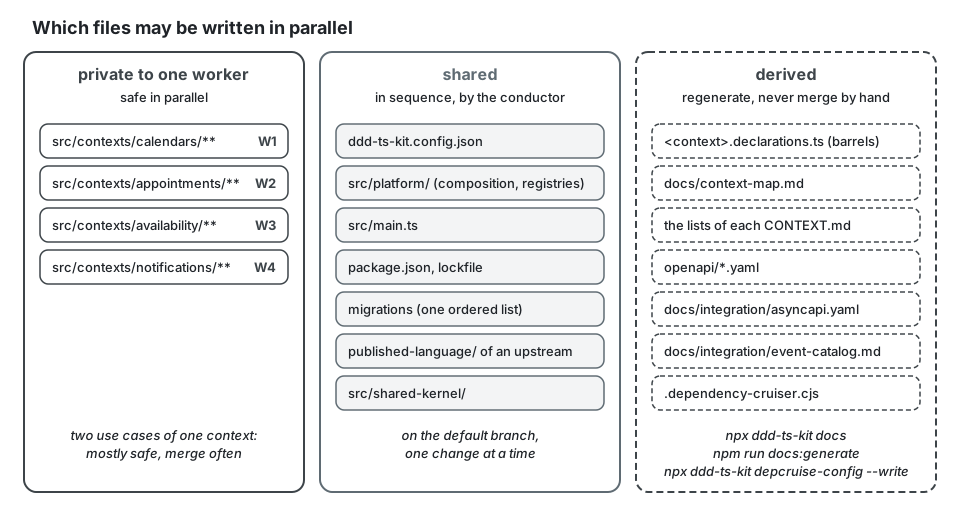
Generated files: regenerate, never resolve by hand
Section titled “Generated files: regenerate, never resolve by hand”The barrel, the context map, the CONTEXT.md lists, the dependency-cruiser configuration, the
OpenAPI document, the AsyncAPI document and the event catalog are all functions of the sources.
When two branches changed one of them, the conflict carries no information. Take either side,
then:
npx ddd-ts-kit docs # context map, CONTEXT.md lists, barrelsnpm run docs:generate # OpenAPI, AsyncAPI, event catalognpm run verifyIn full, for the branch that lands second. Here the notification worker added
GET /notifications/preferences while the default branch received GET /people/invitations from
identity. The OpenAPI document sorts its paths, so both new entries land at the same place,
just before /people/me, and git cannot put one after the other:
git fetch origingit merge origin/main# CONFLICT (content): Merge conflict in openapi/openapi.yamlgit checkout --theirs openapi/openapi.yaml # either side: the file is rewritten belownpx ddd-ts-kit docsnpm run docs:generatenpm run verifygit status --short # every file the generators rewrotegit add openapi/openapi.yaml # file by file, then read the staged diffgit diff --cached --statgit commit --no-editThe regenerated document holds both routes, /notifications/preferences from this branch and
/people/invitations from the default branch, because both are now in the sources.
The generators are deterministic (sorted output, independent of registration order), so two
people regenerating from the same sources get the same bytes. docs --check and
declarations/barrel-current fail the pipeline if somebody forgot.
Who regenerates: whoever merges second. The first branch to land is consistent by itself; the second one rebases or merges the default branch, regenerates, and commits the result with its own change. In a team of agents, give that job to the conductor, not to each worker.
Migrations
Section titled “Migrations”Each context owns its tables in its own database schema, so two contexts never alter the same table. What they share is the ordered list of migration files. Generate the migration last, just before merging, on top of the current default branch; if two branches each added "the next" migration, the second one regenerates its own. Never edit a migration that has run somewhere.
The published language of an upstream
Section titled “The published language of an upstream”A consumer cannot be built against a contract that is still moving. Merge the upstream's declaration first (the event, its publisher, the regenerated catalog), as its own small pull request, then let the consumers start. See "Contracts first" in Team workflow.
Git worktrees
Section titled “Git worktrees”A worktree is a second working directory of the same repository on another branch. It lets several workers run at once on one machine without stashing or switching:
git worktree add ../scheduling-appointments -b feat/appointments-bookgit worktree add ../scheduling-calendars -b feat/calendars-working-hoursFor one worker per context the CLI does it in one command:
npx ddd-ts-kit worker-scope appointmentsIt adds a worktree on the branch build/appointments (by default in
../<project>-appointments; --worktree <path> and --branch <name> change both), writes
.ddd-ts-kit/worker.json naming the context in it, and prints the briefing of that worker:
the directory it may write, the generators it may run, its rows of
docs/architecture/slices.md, the contracts it consumes. --dry-run prints the same without
touching anything. It needs a repository with at least one commit, and an existing worktree is
kept: only the file is written again. init lists .ddd-ts-kit/ in .gitignore, so the file
is never committed. The file is one line of meaning:
{ "context": "appointments"}The briefing is filled from the project. In the example application, an excerpt of what
npx ddd-ts-kit worker-scope notification --dry-run prints (the path shortened, main as the
trunk, and the generators, steps and report left out):
You build the bounded context notification of scheduling.
Worktree: ../scheduling-notification/   Branch: build/notification   Trunk: main
Scope- You may write: src/contexts/notification/** and test/e2e/<use-case>.e2e.spec.ts of your slices.- You may not write anything else. Shared files (config, src/platform, src/main.ts,  package.json, lockfile, migrations, docs/) and other contexts are refused by the guard:  report the need, do not work around it.
Slices, in this order (rows of docs/architecture/slices.md)- #31 Contacts known from identity (projection): `@Projection` over `identity.person.registered` ; ...- #32 Send a notification for a fact of an appointment: `port notification Mailer`; ...- #33 Plan, withdraw and send reminders: `command notification PlanReminder --aggregate Reminder --permission reminder.plan`; ...- #34 Sent notifications of a person: `query notification SearchNotifications --permission notification.read --search` (`GET /notifications`) ; ...
Contracts you consume (read-only): src/contexts/scheduling/published-language/, src/contexts/identity/published-language/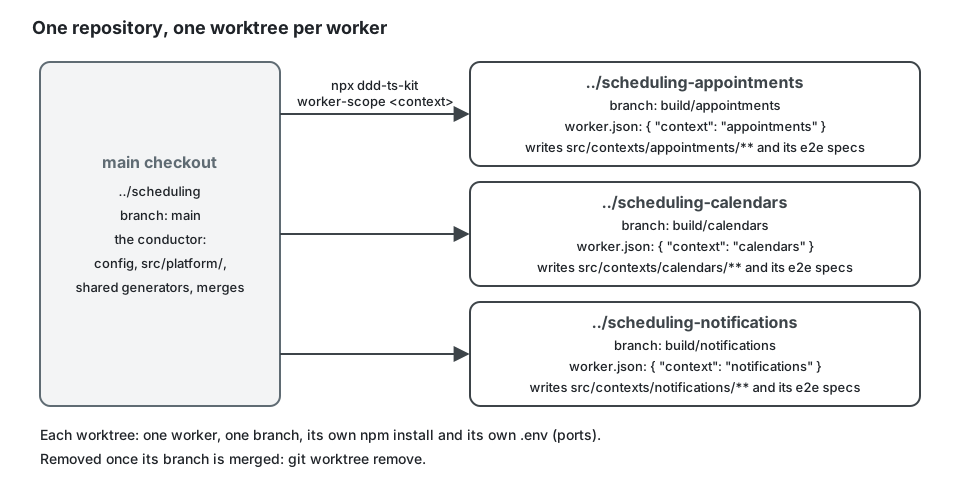
Each worktree needs its own npm install (dependencies are not shared between worktrees) and
its own ports if two of them run npm run dev or the end-to-end tests at once: the generated
docker-compose.yml takes its ports from .env, so give each worktree its own .env. Fast
tests need no server at all (adapter specs can run on an in-process PostgreSQL), which is what
makes four workers on one laptop practical.
Rules that keep worktrees from hurting:
- one worker per worktree, one branch per worktree; a worktree is not a place to share;
- stage file by file, and read the staged diff before committing: a broad
git addin a directory another process writes to commits somebody else's half-finished work; - remove the worktree when its branch is merged (
git worktree remove).
For coding agents specifically: an agent told to work "in the appointments context" that is
started in the main checkout will still read, and may edit, anything. Give it a worktree and
name the directory it owns. The plugin's hook refuses a hand-written file where a generator
exists and any edit of a generated file (the three contracts, the barrel,
.dependency-cruiser.cjs), and asks before a change of the governed files (the config, the
lint, test, compiler and pipeline configuration). For its context-builder agent it goes
further: with a .ddd-ts-kit/worker.json in the worktree, a write outside
src/contexts/<context>/ and the end-to-end specs is refused, and so are a generator that
writes shared files and a dependency change. A worker passes --local-only to generate:
the command then refuses, and writes nothing, when the kind would write outside its context:
$ npx ddd-ts-kit generate job notification SendDueConfirmations --every 15m --command SendNotification --local-onlyError: --local-only: this command would write 2 shared files: src/platform/auth/relate-system-actors.ts, src/platform/job-settings.ts. fix: Nothing was written. Have it run on the trunk without --local-only (the conductor of a parallel build does it), merge the trunk, then go on; a generated document listed alone means the trunk is stale: run `ddd-ts-kit docs` there first.Merge order
Section titled “Merge order”- The bootstrap, alone, first.
- Contracts, upstream before downstream: follow the arrows of the context map.
- Slices inside each context, in any order between contexts.
- Consumers of an event, after the event's declaration is merged (they do not need the producer's behaviour to exist: a handler is tested with events built from the declaration).
- End-to-end specs that cross contexts, last, when both sides are in.
Merge small and often. Two branches that each lived a week will conflict in the aggregate and in every derived file; the same work in ten pull requests conflicts in none.
A concrete plan: four contexts, four workers
Section titled “A concrete plan: four contexts, four workers”A scheduling application with four contexts: calendars, appointments, availability,
notifications (analytics is added later the same way; identity is bought, not built). The
example application of this repository ran the same kind of plan on its own four contexts
(identity, scheduling, notification, analytics), with scheduling shared by two
workers on two aggregates: its table is
examples/scheduling/docs/architecture/slices.md.
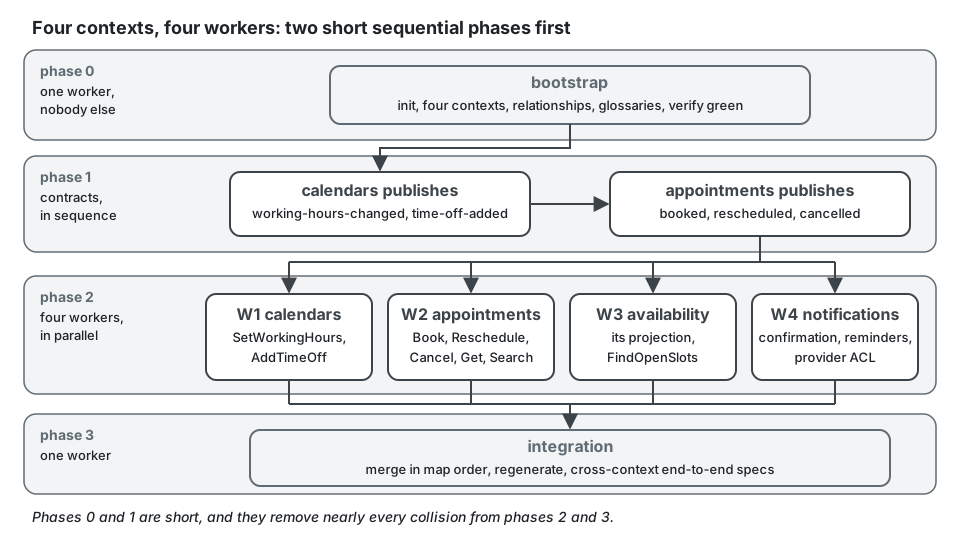
Phase 0, shared bootstrap (one worker, nobody else starts).
npx ddd-ts-kit init --context calendars:supporting --context appointments:core \ --context availability:supporting --context notifications:supportingpnpm install && pnpm run verify # npm install && npm run verify with --package-manager npmThen, still sequentially, because each of these edits the config or a shared registration:
the upstreams of each context (appointments names calendars; availability names
calendars and appointments; notifications names appointments), the first terms of each
glossary, and any dependency the stack needs. Merge. From here on, the config is frozen for
the phase.
Phase 1, contracts (sequential, each a small pull request). The two upstreams declare
their integration events with generate integration-event. The aggregates behind them can be
empty shells: what matters is the declared type, version and payload. Regenerate the catalog.
Merge calendars first, then appointments.
Phase 2, four workers, each in a worktree, each owning one directory.
| Worker | Owns | Builds | Depends on (already merged) |
|---|---|---|---|
| W1 | src/contexts/calendars/ |
Calendar aggregate, SetWorkingHours, AddTimeOff, their routes; emits the two events |
nothing |
| W2 | src/contexts/appointments/ |
Appointment aggregate, the booking commands and queries, the no-double-booking constraint; emits the three events |
the declared calendars events, if it keeps a local copy of working hours |
| W3 | src/contexts/availability/ |
integration handlers feeding its projection, FindOpenSlots |
the declared events of both upstreams |
| W4 | src/contexts/notifications/ |
handler under the consumer name notifications.appointments-appointment-booked (the generated form, <context>.<reaction>), the job notifications.send-reminders, the anti-corruption layer of the provider |
the declared appointments events |
Each worker's brief says: the one directory it may write, the files it must not touch (the
config, src/platform/, src/main.ts, another context, any generated document), that it must
not regenerate shared documents, and that it stops and reports if its slice seems to need a
change outside its directory. worker-scope prints that brief. W3 and W4 test their handlers with events built from the
declarations; they do not wait for W1 and W2 to finish.
Phase 3, integration (one worker). Merge in the order of the map (calendars,
appointments, availability, notifications), regenerate the derived files after each
merge, write the migrations in sequence, then add the end-to-end specs that cross contexts
(book an appointment, observe the confirmation and the slot disappearing) and run
npm run verify.
The plugin writes the same plan down as a table: the skill plan-slices produces
docs/architecture/slices.md, where each row is a contract, a skeleton (an aggregate and
its repository, whose generators also write shared files) or a slice, with an owner and the
rows it depends on. Contracts and skeletons belong to the conductor, slices to the worker of
their context, and only the conductor edits the file. npx ddd-ts-kit status reads it back:
the slices by status and by owner, and the TODO(domain), TODO(platform) and it.todo left
in each context; npx ddd-ts-kit todo <context> lists them as file:line.
Four rows of that table in the example application, as status and worker-scope read them:
| # | Context | Kind | Slice | Start with | Depends on | Owner | Status |
|---|---|---|---|---|---|---|---|
| 3 | notification | skeleton | Notification, Reminder | aggregate notification <Name> then repository notification <Name>, twice |
conductor | done | |
| 31 | notification | slice | Contacts known from identity (projection) | @Projection over identity.person.registered |
4 | notification | todo |
| 32 | notification | slice | Send a notification for a fact of an appointment | port notification Mailer; adapter notification Mailer --kind external --decorators; command notification SendNotification --aggregate Notification --permission notification.send; integration-handler notification scheduling scheduling.appointment.booked, .confirmed, .rescheduled, .cancelled |
3, 5, 31 | notification | todo |
| 34 | notification | slice | Sent notifications of a person | query notification SearchNotifications --permission notification.read --search (GET /notifications) |
32 | notification | todo |
Row 3 is a skeleton: its generators write the schema index of the platform, so the conductor
runs it on the trunk. Rows 31, 32 and 34 belong to the notification worker, as does row 33, left out of this
excerpt; the worker starts each one once the rows it depends on are merged.
What makes the plan work is that phases 0 and 1 are deliberately not parallel. They take a small fraction of the total time and remove nearly every collision from the rest.
Limits and when not to use it
Section titled “Limits and when not to use it”- Parallelism does not help discovery. While the boundaries and the language are still moving, four workers produce four incompatible guesses. Split only after the bootstrap and the contracts are merged.
- Inside one context the gain is small. Use cases share the aggregate; past two workers the merges cost more than the parallelism returns.
- A context whose upstream contract is not stable cannot start. Sequence it.
- Agents multiply cost as well as speed. Each one carries its own context window; four workers spend roughly four times the tokens of one, see Token economy. On one machine they also share memory, CPU, ports and the Docker daemon.
- Nothing locks a file between people. The rules forbid cross-context imports; they do not
stop two branches from editing the config. The sequencing above is a discipline, held by
review and by the brief each worker receives. The confinement by
.ddd-ts-kit/worker.jsondescribed above applies only to the plugin'scontext-builderagent, inside a Claude Code session, and fails open like the rest of the hook;--local-onlyholds for anyone, but only for whatgeneratewrites. - The plan assumes the declared style with a barrel per context. In the explicit style,
<context>.module.tsis a hand-maintained registration file inside each context: still private to the context, but a conflict point between two use cases of that context.
Sources
Section titled “Sources”- Git documentation,
git-worktree, https://git-scm.com/docs/git-worktree - Matthew Skelton and Manuel Pais, Team Topologies, IT Revolution, 2019.
- Sam Newman, Building Microservices, 2nd edition, O'Reilly, 2021, chapter 5 (contracts and consumer-first design).
- This repository: the CLI README (what each generator writes,
marker regions, derived barrels,
worker-scope), the skillsparallel-workandplan-slices.