
Import aliases: tsconfig paths, rewritten at build
Summary. A project built with the kit imports its own files by an alias, never by a
relative path, and without an extension: @/contexts/billing/domain/aggregates/invoice.aggregate
instead of ../../../domain/aggregates/invoice.aggregate.js. The alias of the source root is
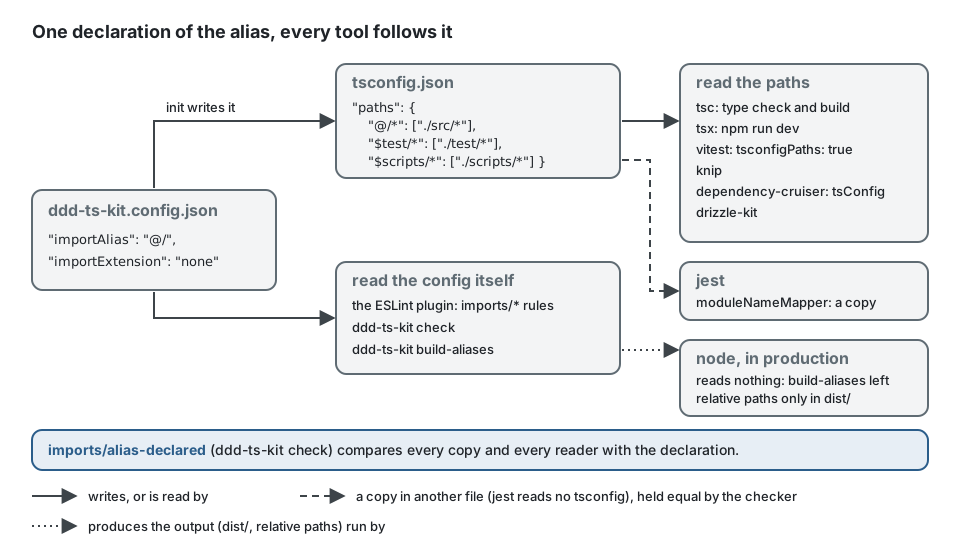
@/. It is declared once, under paths in tsconfig.json, which the compiler, the dev runner,
the test runner, knip and dependency-cruiser read. Node reads no tsconfig.json and completes
no extension, so the build has a second step: ddd-ts-kit build-aliases rewrites every alias of
the compiled output into a relative path ending in .js, and production runs with plain
node dist/src/main.js, without a loader, a flag or a runtime dependency. Three rules hold it:
imports/alias-only (every import uses the alias, ESLint fixes it), imports/extension (every
import ends as the config says, ESLint fixes it) and imports/alias-declared (the declarations,
everything that has to follow them, and the build step agree).
What is being decided
Section titled “What is being decided”An alias is declared somewhere and then resolved by many tools: the type checker, the build,
node in production, the dev runner, the test runner, ESLint, ddd-ts-kit check,
dependency-cruiser, knip. If two of them resolve it differently, nothing fails where the
mistake is made: the type check passes on one file while production loads another, or a
boundary rule stops seeing an import. So the decision is less "which prefix" than "which
mechanism lets every tool follow one declaration".
In a handler of a generated project, every import of a file of the project starts with the alias and carries no extension:
import { CommandHandler } from '@ddd-ts-kit/kernel/declarations'; // a package: never rewrittenimport { Invoice } from '@/contexts/billing/domain/aggregates/invoice.aggregate';import type { InvoiceRepository } from '@/contexts/billing/domain/repositories/invoice.repository';import { IssueInvoiceCommand } from '@/contexts/billing/application/commands/issue-invoice/issue-invoice.command';The path after @/ is the path of the file under src/: moving a file changes its imports in
the files that import it, never in the file itself, and the import says which context and which
layer it reaches, which is what the boundary rules judge.
Why @/ cannot be a Node subpath import
Section titled “Why @/ cannot be a Node subpath import”Node resolves one kind of alias by itself: a subpath import, declared under the imports field
of package.json. Its specifier has to start with #: that is how Node tells it from a
package. @/x.js starts with @, so Node reads it as a package of an empty scope and fails
(ERR_MODULE_NOT_FOUND, "Cannot find package"). A project that wants @/ therefore declares
it for the compiler and removes it before Node sees it.
tsconfig paths (@/) and a rewrite at build |
Node subpath imports (#name/) |
tsconfig paths and a runtime resolver |
|
|---|---|---|---|
| Spelling | free: @/ |
#, then a name (Node 22 refuses a bare # and a slash) |
free |
| Declared in | tsconfig.json |
package.json |
tsconfig.json |
Plain node dist/src/main.js |
yes, once the build rewrote the emitted specifiers | yes, natively | no: a loader or a require hook in production |
| Type check, tsx, vitest, knip, drizzle-kit | read paths |
read package.json; each source-reading tool needs a resolution condition, or it loads dist/ |
read paths |
| dependency-cruiser | reads paths through its tsConfig option |
reads package.json under a condition |
reads paths |
| jest | moduleNameMapper, a second declaration |
reads package.json under a condition |
moduleNameMapper |
| What can drift | a repeated mapping (jest), a tool no longer told to read tsconfig, a build without the rewrite | the condition of each source-reading tool | every repeated mapping, and a start command without the loader |
A stale dist/ loaded by a dev tool |
impossible: paths only names sources |
possible when a condition is forgotten | impossible |
The kit takes the first column. The rewrite is a command of the kit, not a third-party package.
The extension: written nowhere, or .js
Section titled “The extension: written nowhere, or .js”importExtension in ddd-ts-kit.config.json says how an import of a file of the project ends.
init writes none; --import-extension js asks for the other spelling, which is also what a
config without the key means, so a project generated before the key existed keeps working
untouched.
none (default of a new project) |
js |
|
|---|---|---|
| An import | '@/contexts/billing/domain/aggregates/invoice.aggregate' |
'@/contexts/billing/domain/aggregates/invoice.aggregate.js' |
tsconfig.json |
"module": "ESNext", "moduleResolution": "Bundler", "customConditions": ["node"] |
"module": "NodeNext", "moduleResolution": "NodeNext" |
| What the compiler accepts | both spellings, and a directory that holds an index.ts |
.js only (TS2835 otherwise) |
| Who refuses the other spelling | imports/extension (checker and ESLint), then build-aliases |
the compiler, imports/extension, then build-aliases |
| A file that does not exist | TS2307, by both compilers |
TS2307, by both compilers |
| What the compiler emits | ECMAScript modules, the specifier as written | ECMAScript modules, the specifier as written |
What build-aliases writes |
'../../../domain/aggregates/invoice.aggregate.js' |
the same |
Why Node needs the extension. The loader of ECMAScript modules resolves a relative
specifier as a URL: ./invoice.aggregate is the file of that exact name, and nothing tries
.js or an index.js behind it (ERR_MODULE_NOT_FOUND, ERR_UNSUPPORTED_DIR_IMPORT). Only
the sources can leave the extension out, because every tool that reads them resolves through
paths, which completes it. The compiler never rewrites a specifier, so the step that already
turns an alias into a relative path is the one that writes the extension. Since every import of
the project is an alias (imports/alias-only refuses a relative one), that step sees them all.
An import names a file, never a directory. Under none the compiler would resolve
@/contexts/billing/published-language to its index.ts. The kit does not allow it: the import
is written @/contexts/billing/published-language/index, in both spellings. One specifier then
names one file, a file x.ts next to a directory x/ is never ambiguous, and the build has
nothing to guess. ddd-ts-kit check reports a directory import (imports/extension: it is the
one case that needs the disk, so ESLint does not see it) and build-aliases refuses it.
// Instead of: a directory, which the compiler resolves to its index.ts and Node does not.import { InvoiceIssued } from '@/contexts/billing/published-language';
// Write: the file.import { InvoiceIssued } from '@/contexts/billing/published-language/index';
A dot is not an extension. invoice.aggregate, issue-invoice.command and main are all
written as they are. Only .js, .mjs, .cjs, .ts, .mts and .cts are read as an
extension, and only on a specifier that starts with an alias of the project: a package subpath
that ends like a file name (zod/v4/core.js, @scope/package/file.js) is never judged and
never rewritten.
The declaration
Section titled “The declaration”A person edits one thing: importAlias in ddd-ts-kit.config.json (@/ by default). init
writes the declaration from it:
"paths": { "@/*": ["./src/*"], "$test/*": ["./test/*"], "$scripts/*": ["./scripts/*"]}| Alias | Directory | Notes |
|---|---|---|
importAlias, @/ by default |
sourceRoot |
the only one the config renames |
$test/ |
test/ |
not part of the build: the compiler only emits a file of it when a shipped source imports it |
$scripts/ |
scripts/ |
built with the sources (dist/scripts) |
$generated/ |
generated/ |
with stack.orm prisma only: the client Prisma generates |
tsconfig.build.json extends tsconfig.json and declares no paths of its own.
Why $test/ and not @test/
Section titled “Why $test/ and not @test/”@test/x is also the name a package may bear on the registry (scope test). The risk was
measured: with a package placed at node_modules/@test/decoy and a file of the project at
test/decoy/where.ts, the compiler, tsx and vitest answered the file of the project, and
dependency-cruiser answered the package. It tries the specifier as written first (where.js,
which only exists in the package) and falls back to the TypeScript source only when nothing
was found. A guard on package.json cannot repair a tool that reads another file, so the kit
takes spellings that cannot be a package name at all:
@/: a scope has a name, an empty one names no package;$<name>/:$is not allowed in a package name. The registry accepts only names equal to their URL encoding;validate-npm-package-nameanswers "name can only contain URL-friendly characters" for$test, for new and for old packages.
SvelteKit spells its own aliases the same way ($lib, $app). importAlias accepts the two
forms: @/, or $, one name in lower case that starts with a letter (then letters, digits,
hyphens) and /. init and check refuse the rest and say why: #name/ (a Node subpath
import, another mechanism), @name/ (the name of a scope), name/ or ~/ (possible package
names), and $test/, $scripts/, $generated/ (already taken).
What each tool reads
Section titled “What each tool reads”| Tool | What it reads | What the kit writes for it |
|---|---|---|
| TypeScript 6 and 7 (type check, build, the editor) | paths, module and moduleResolution of tsconfig.json |
the entries above, and the resolution importExtension asks for |
ddd-ts-kit build-aliases (second step of npm run build) |
importAlias, importExtension and sourceRoot of the config, rootDir and outDir of tsconfig.build.json |
the build script chains it after the compiler |
node (production, npm start, the Docker image) |
nothing: the output holds relative paths only | nothing |
tsx (npm run dev) |
paths, by itself, also for a file loaded with --import |
nothing: the script has no flag for it |
| vitest | paths, once told to |
resolve: { tsconfigPaths: true } in its configs (native to vite 8, no plugin) |
| jest | nothing of tsconfig | moduleNameMapper, the same entries, each pattern ending as the imports do: '^@/(.*)$': '<rootDir>/src/$1.ts' under none, '^@/(.*)\\.js$': '<rootDir>/src/$1.ts' under js. The target is always the TypeScript source |
| dependency-cruiser | paths, once told to |
tsConfig: { fileName: 'tsconfig.json' } in the generated .dependency-cruiser.cjs |
| knip | paths, by itself |
nothing |
drizzle-kit (npm run db:generate <what-it-does>) |
paths, by itself, when it loads the TypeScript schema |
nothing: the script is plain drizzle-kit generate --name |
| knex and TypeORM CLIs | the compiled output (npm run build first) |
a knex migration is a JavaScript file at the project root: it names the compiled schema by its relative path under dist/ |
| Prisma CLI | prisma.config.ts, which imports no file of the project |
nothing |
ESLint with @ddd-ts-kit/eslint-plugin, ddd-ts-kit check |
importAlias, importExtension and sourceRoot of the config |
they classify an import by its path and never load a file: with or without its extension, a specifier names the same source, and the boundary rules judge it the same |
| Biome | nothing | it formats; a fixed import that passes the line width is wrapped by npm run format |
What the kit writes in the three tools that need to be told, as init generates it under
importExtension: "none":
// vitest.config.ts: the specs resolve an alias from the paths of tsconfig.json.export default defineConfig({ resolve: { tsconfigPaths: true },});// jest.config.js: jest reads no tsconfig, so the mapping is repeated, each target a source.moduleNameMapper: { '^@/(.*)$': '<rootDir>/src/$1.ts', '^\\$test/(.*)$': '<rootDir>/test/$1.ts', '^\\$scripts/(.*)$': '<rootDir>/scripts/$1.ts',},// .dependency-cruiser.cjs, options: without it no boundary rule would see an alias import.tsConfig: { fileName: 'tsconfig.json' },Under js, each jest pattern ends with \\.js$ instead of $. imports/alias-declared holds
all three (below).
The build step
Section titled “The build step”npm run build = tsc -p tsconfig.build.json && ddd-ts-kit build-aliases(The generated script calls the native compiler,
node node_modules/@typescript/native/bin/tsc -p tsconfig.build.json.)
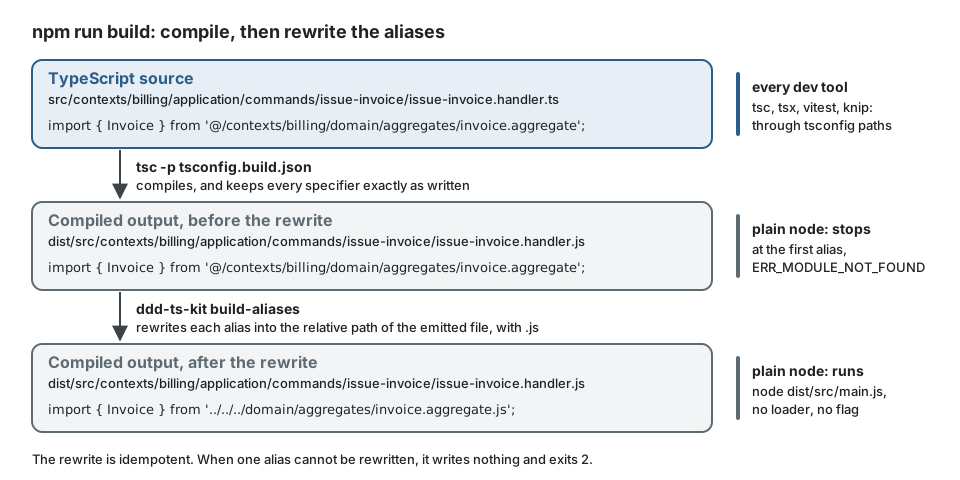
ddd-ts-kit build-aliases [--project <tsconfig>] (default tsconfig.build.json) reads the
output directory of that tsconfig and, in every .js, .mjs, .cjs, .d.ts, .d.mts and
.d.cts under it, turns each alias specifier into the relative path of the emitted file it
names, always with its .js extension, whichever spelling the sources use:
import { Invoice } from '@/contexts/billing/domain/aggregates/invoice.aggregate'; // emitted by the compilerimport { Invoice } from '../../../domain/aggregates/invoice.aggregate.js'; // after the rewriteThe file a specifier names is computed, not searched: under none, @/x is x.js of the
output; under js, @/x.js is. Nothing else is tried: no index.js behind a directory, no
extension added to or removed from a specifier written the other way.
What it rewrites: the specifier of import ... from, export ... from, a bare import '...',
import('...') with a string literal (attributes included), require('...'),
import.meta.resolve('...'), and, in declarations, import type, typeof import("...") and
declare module '...'.
How it stays exact. It does not search the text for the prefix. It runs the scanner the checker
already uses (packages/cli/src/check/scan), which walks the file once and tells code from
comments, strings, template literals and regular expressions; a string literal is rewritten
only when the code before it is an import, export or import( position. A string that merely
looks like an import (inside another string, a comment, a template, a regular expression, a
method named import) is never touched. The target is computed from rootDir and outDir,
then looked up on disk.
It fails, exits 2 and writes nothing when:
- an alias names no emitted file (
"@/x" names no file the build emitted): a typo the compiler already reported, or a module that only has a declaration; - an alias names a directory (
"@/x" names a directory: an alias names one file, write "@/x/index"); - an alias is written in the spelling the config does not ask for (
"@/x.js" has an extension although "importExtension" is "none": write "@/x", and the reverse underjs); import()orrequire()is given an alias completed at run time (import(`@/handlers/${name}`),import('@/handlers/' + name)): no tool can know the file, and Node knows no alias. Build the path fromimport.meta.urlinstead, as the generatedscripts/events.tsdoes (that path names a compiled file and keeps its.js);- the tsconfig names no output directory that exists.
// Instead of: an alias completed at run time; build-aliases refuses it.const exported = await import(`@/contexts/${context}/published-language/index`);
// Write: a URL computed from the place of this file, naming the compiled file with its .js.// From scripts/events.ts, compiled to dist/scripts/events.js, ../src/ is dist/src/.const index = new URL(`../src/contexts/${context}/published-language/index.js`, import.meta.url);const exported: unknown = await import(index.href);
It is idempotent: a second run finds nothing to rewrite. A rewrite never adds or removes a
line break and the source maps are not modified: every mapping keeps its line and sources is
untouched. On the line of a rewritten specifier, what follows it (the closing ; of a static
import) moves by the difference of length, which the map does not record.
What was measured
Section titled “What was measured”On Node 24.21.0, TypeScript 6.0.3 and the native TypeScript 7.0.2, tsx 4.23.15, vitest 5.0.3
(vite 8.3.4), knip 6.41.0, dependency-cruiser 18.5.0; by hand, outside the workspace, jest
30.5.2, drizzle-kit 0.31.11 and TypeORM 1.1.2. The end-to-end suite replays it on every stack
in the default spelling, without an extension, and on three stacks written with .js; the
proofs about one tool are replayed in both spellings. CI runs the run-time part on Node 22 as
well (npm run ci:test:alias).
- Compiled and not rewritten, the output does not run: plain
nodestops at the first alias. Rewritten, it runs: every compiled module of a generated project and of the example links, the application, the worker and a context run alone start, and no alias is left in a.jsor a.d.ts. Node itself completes no extension:import('./dist/src/main')fails where./dist/src/main.jsloads. - Both compilers map
@/xtosrc/x.tsunderBundler, and@/x.jstosrc/x.tsunderNodeNext(--explainFiles), never todist/; both reportTS2307for a specifier that names no file, in both spellings; both type-check every stack and both decorator modes. - tsx resolves
@/x(and@/x.js) tosrc/x.tswith no flag, also when a compiled copy exists and also for a module loaded by--import ./src/platform/tracing.ts. - vitest with
resolve.tsconfigPathsruns a spec on the source although a compiled copy exists; without it the spec fails on its first import. The decorator plugin of@ddd-ts-kit/testing/vitestcompiles a file whose imports carry no extension as it did before. - jest with the generated
moduleNameMapperloads the source although a compiled copy exists, in both spellings; without it, "Cannot find module '@/alias-probe'". - dependency-cruiser follows the alias to the source and holds no module under
dist/; the boundary rules report an alias import exactly as a relative one, with or without its extension. - knip reports an unused file and an unused export behind the alias, and nothing for a file that is only imported by its alias.
- drizzle-kit generates a migration from a schema that re-exports tables by their alias,
written without an extension, and fails once
pathsis removed. - TypeORM, knex and Prisma read no TypeScript of the project through an alias: the TypeORM
CLI loads the compiled data source (rewritten, so plain
nodeloads it), a knex migration is a JavaScript file that names the compiled schema by a relative path with its.js, andprisma.config.tsimports no file of the project. - A stale
dist/cannot be loaded by a dev tool:pathsnames sources only, and a tool that ignorespathsfails instead of falling back.
The three rules
Section titled “The three rules”imports/alias-only: under the source root, test/ and scripts/, an import, an
export ... from or an import() of a file of the project uses the alias. A relative
specifier is refused, the same directory included, and so is an alias path with a . or ..
segment. eslint --fix rewrites a relative import: it computes the alias from the place of
the file and the config. An alias path with a . or .. segment is reported without an
automatic fix: you write the path from the alias directory by hand. Not judged: a JavaScript file at the project root (a tool config, a
knex migration, which Node runs as written and which therefore uses relative paths), and the
client under generated/. A directory given to discoverContext as a URL is not an import.
// Instead of: relative paths, which change when the file moves.import { Invoice } from '../../../domain/aggregates/invoice.aggregate';import { IssueInvoiceCommand } from './issue-invoice.command';import { Money } from '@/shared-kernel/../shared-kernel/money'; // a `..` segment in an alias
// Write: the alias, computed from the place of the file (`eslint --fix` rewrites these two).import { Invoice } from '@/contexts/billing/domain/aggregates/invoice.aggregate';import { IssueInvoiceCommand } from '@/contexts/billing/application/commands/issue-invoice/issue-invoice.command';// The `..` segment has no automatic fix: rewrite it by hand, from the alias directory.import { Money } from '@/shared-kernel/money';imports/extension: in the same three trees, an alias specifier ends as importExtension
says. Under none it carries none of .js, .mjs, .cjs, .ts, .mts, .cts, and names
no directory (the checker alone sees that one); under js it ends with .js. eslint --fix
removes or writes the extension. Under js the compiler holds the same thing (TS2835); under
none nothing else does before the build, since the bundler resolution accepts both.
// Instead of, under "importExtension": "none":import { Invoice } from '@/contexts/billing/domain/aggregates/invoice.aggregate.js';
// Write:import { Invoice } from '@/contexts/billing/domain/aggregates/invoice.aggregate';
// And under "importExtension": "js", the other way round:import { Invoice } from '@/contexts/billing/domain/aggregates/invoice.aggregate.js';imports/alias-declared, held by ddd-ts-kit check, compares the declarations and every
place that has to follow them. For instance, in tsconfig.json:
// Instead of: a baseUrl, and a target that names the compiled output."baseUrl": ".","paths": { "@/*": ["./dist/src/*"] }
// Write: exactly what importAlias gives, and nothing else under an alias of the project."paths": {  "@/*": ["./src/*"],  "$test/*": ["./test/*"],  "$scripts/*": ["./scripts/*"]}
What it reports:
| It reports | Because |
|---|---|
an importAlias that is not @/ or $<name>/, or that is $test/, $scripts/, $generated/ |
it could be a package name, it is another mechanism (#), or it names another directory; init refuses it too |
a paths entry of tsconfig.json that is missing, or not exactly what importAlias gives (for instance one that names dist/) |
it is the declaration the compiler and the tools read |
another paths entry under an alias of the project |
the build rewrites from importAlias alone: the output would load another file than the one that was checked |
a baseUrl |
every paths target would be resolved from it |
a tsconfig.build.json whose paths or baseUrl differ from tsconfig.json |
the build would not compile what was checked |
module and moduleResolution of tsconfig.json, or of a tsconfig.build.json that sets its own, that are not what importExtension gives (ESNext, Bundler and customConditions holding node under none; under js, a written value that is not Node16, Node18, Node20 or NodeNext) |
under the other resolution the compiler refuses every import of the project, or accepts a spelling the build does not rewrite; another module format would not be the ECMAScript modules the build completes |
a script that compiles (tsc without --noEmit) and does not run build-aliases afterwards |
the output would stop under node at its first import: no alias, and under none no extension either |
a script that runs tsx with --tsconfig on another file |
the dev runner would read a declaration nothing compares |
a vitest config at the project root without tsconfigPaths: true (one that extends another config of the project is read as carrying it) |
the specs would not resolve an alias |
a jest config that lacks one of the derived moduleNameMapper entries, maps it elsewhere, or whose pattern does not end as the imports do |
jest reads no tsconfig: it is the one repeated mapping |
a .dependency-cruiser.cjs without tsConfig: { fileName: 'tsconfig.json' } |
the boundary rules would see nothing; ddd-ts-kit depcruise-config --check reports the same file |
a paths entry of knip.json under an alias |
a second declaration |
The boundary rules themselves (layer/*, context/*) resolve an alias exactly as a relative
path, in the checker and in the ESLint plugin: one table of forbidden imports is replayed
against both, in both spellings.
An alias that names no file is reported by the compiler (TS2307), by dependency-cruiser (the
module resolves to nothing), by knip (unresolved import) and by build-aliases.
Moving an existing project to imports without an extension
Section titled “Moving an existing project to imports without an extension”A project generated before importExtension existed has no such key: it is read as js, and
nothing has to change. To move it: set "importExtension": "none", write the module,
moduleResolution and customConditions that ddd-ts-kit check then asks for (and the jest mapping, on jest), run
eslint --fix and npm run format, then ddd-ts-kit docs for the declarations barrels and
npm run verify. On the example application of this repository the fix rewrote 2101 imports in
561 files, and the formatter then joined the few statements that fit on one line again.
Limits
Section titled “Limits”- Under
nonethe compiler resolves as a bundler does, not as Node does. It still checks that every import names a file and every name exists, but it no longer models how Node loads a CommonJS package from an ECMAScript module: a default import of a package that Node would hand over as{ default: ... }type-checks and fails at run time, whereNodeNextreports it. What holds it is the run: the specs execute on Node, and the end-to-end suite links every compiled module of every stack under plainnode. A team that wants the compiler to model Node exactly keeps"importExtension": "js". - The bundler resolution reads the
exportsof a package without thenodecondition: a package that publishes one entry for Node and another for the rest would be type-checked against the wrong one (measured on both compilers). The generatedtsconfig.jsontherefore sets"customConditions": ["node"], andimports/alias-declaredreports its removal. - Only a module the build emits can be named by an alias in shipped code. A JSON file or another asset is read at run time, not imported.
- A JavaScript file Node runs as written (a config, a knex migration) cannot use the alias: nothing rewrites it.
tsc --watchalone leaves the aliases indist/: a compiled output is produced bynpm run build. Development runs the sources (npm run dev), notdist/.- After a rewrite, a source map still names the right line; the column of what follows a rewritten specifier on the same line is off by the difference of length.
- Renaming the alias of an existing project is three edits, not a command:
importAliasin the config, thepathsentry (the fix ofimports/alias-declaredgives it), and a search and replace of the prefix in the sources. - A tool the kit does not know that loads the TypeScript sources itself has to read the
pathsoftsconfig.jsonor be given the mapping;checkknows tsx, vitest, jest, dependency-cruiser and knip.
Recommendation
Section titled “Recommendation”Keep @/, and keep the default spelling, without an extension. Pass --import-alias '$<name>/'
to init only when @/ is already taken by something else in the project, and
--import-extension js only when the compiler has to resolve exactly as Node does. Run eslint --fix then npm run format to move existing code,
and let ddd-ts-kit check say what is left.