
Token economy: spending less with coding agents
Summary. A coding agent pays for everything it reads, on every turn, and most of what it reads on an unstructured project is spent finding out where things are. This kit removes a large part of that cost by construction: predictable paths, one concept per small file, generated boilerplate, machine-readable maps, rules scoped by path and generated per-context documentation. The first half of this guide explains why that works and the habits that go with it. The second half reviews complementary tools that are widely used and maintained as of 2026-10-10 (symbol navigation through a language server, structural and text search, symbol indexes, repository packers, library documentation retrieval), with what each does, its maturity, its limits and how it combines with the kit, and ends with a decision table. No tool below is required by the kit.
Where the tokens go
Section titled “Where the tokens go”An agent session re-sends its whole conversation with each request, and every tool result (a file read, a search output, a test log) stays in that conversation until it is cleared or compacted. Three costs dominate:
- Exploration: listing directories, searching, opening candidate files to find the one that matters.
- Reading more than needed: a 900-line file opened for one method; a test log of ten thousand lines read for one failure.
- Rework: code written in the wrong place or the wrong shape, then found by a check or a reviewer and rewritten.
Output is the smaller part, and generated boilerplate removes most of it. The levers are therefore: know where to look without searching, read small things, and be right the first time.
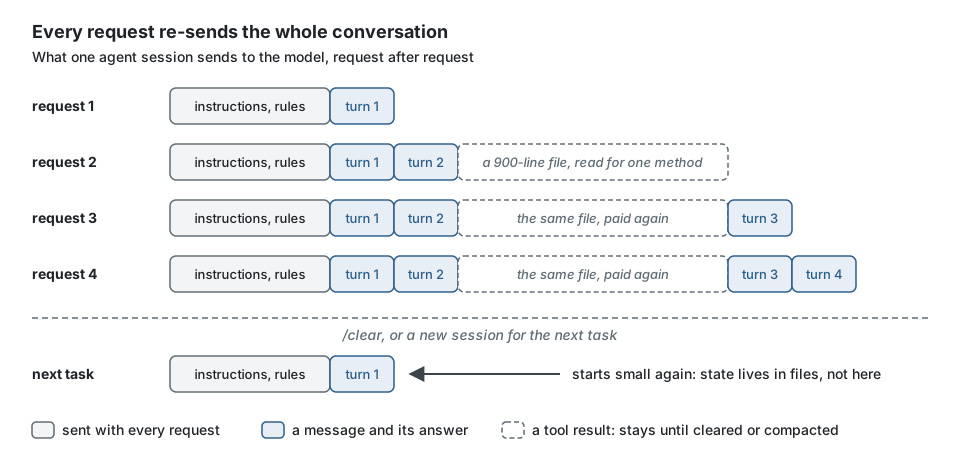
The second cost is the one that grows quietly: a tool result is not paid once, it is paid by every request that follows until the conversation is cleared or compacted. Reading 40 lines instead of 900 saves on every later turn of the session, not only on the turn that read them.
Why structure saves tokens
Section titled “Why structure saves tokens”| Property of a project built with the kit | What the agent no longer does |
|---|---|
Predictable paths. The canonical tree is closed, and a file's role is in its directory and suffix (*.aggregate.ts, *.handler.ts, *.repository.ts) |
search for "where is the handler of X": the path is computable from the use case name |
One concept per small file (naming/one-concept-per-file, a size ceiling on functions and files) |
read a large file to use ten lines of it |
Generated boilerplate. generate writes the file, its spec, its builder and its wiring |
write, and get subtly wrong, the constructor visibility, the suffix, the registration |
--json output with next: the file:line of every TODO(domain) |
open the generated files to find what is left to decide |
Machine-readable maps. ddd-ts-kit list --json gives contexts, aggregates, use cases, events, handlers, permissions; describe <context> --json gives one context as facts (use cases with their permission, routes, events, ports with their adapters, policies, gateways, dependencies); status and todo give the next step of the plan, the slices and the markers left as file:line |
walk the tree to learn what exists and what is left |
Path-scoped rules. init writes .claude/rules/*.md, each scoped by a paths frontmatter, the same rules for Copilot in .github/instructions/, scoped by applyTo, next to a short AGENTS.md that every agent reads |
carry the domain rules in context while editing a route, and the reverse |
Generated per-context documentation. CONTEXT.md with its generated lists and ## Reference, docs/context-map.md |
read the code of a neighbouring context to learn what it publishes |
A fix sentence on every violation, and explain <rule-id> |
guess at a rule from a failing check |
| Checks at each write (the plugin's hook runs the per-file check) | discover a layer violation after the whole feature is written |
| Fast, local test levels: domain and application specs run in milliseconds without infrastructure | wait on, and read the output of, a full stack to check one rule |
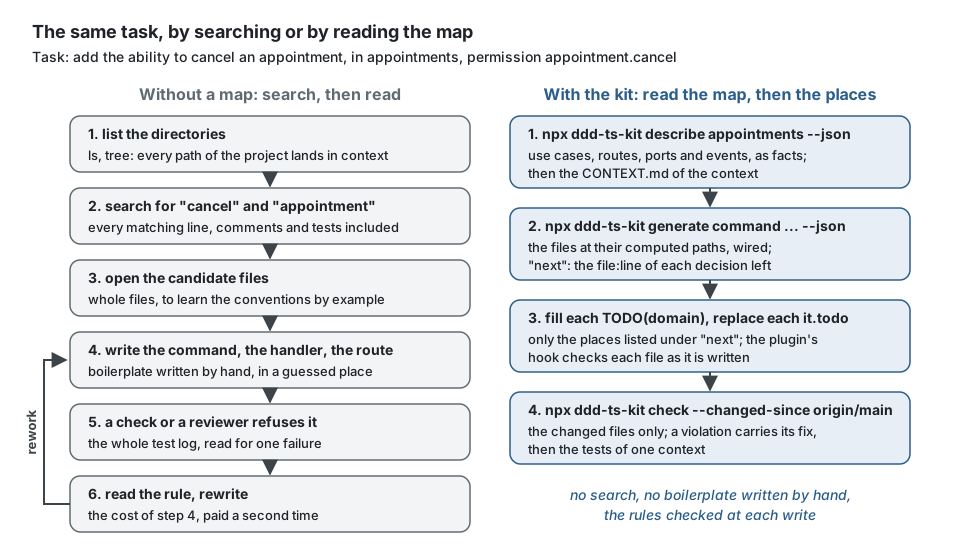
The same task, walked both ways:
The session start hook of the plugin also reminds the order of work, the next step of the plan
and a one-line map per context, capped in size, so a new session does not begin by
rediscovering them. When the installed ddd-ts-kit is not the version the skills of the plugin
describe, a line says so first, with the move to make. On the example application, with
the CLI installed, a session starts with:
ddd-ts-kit project (DDD, Clean Architecture). The rules are checked: `npx ddd-ts-kit explain <rule-id>`.Order of work: glossary of the context (CONTEXT.md), `npx ddd-ts-kit generate <kind> ... --json`, fill only the TODO(domain) places it lists, tests, `npx ddd-ts-kit check --changed-since <ref>`, then commit the slice.Never write by hand a file a generator produces; never edit a generated file (declaration barrels, contracts).Read `npx ddd-ts-kit list --json` and the CONTEXT.md of one context instead of browsing the tree.Plan: docs/architecture/plan.md (resume with /ddd-ts-kit:start). Next: doneContexts:analytics [supporting] upstreams: scheduling; glossary: 9 terms; 0 aggregates, 0 commands, 1 queries, 0 published eventsidentity [supporting] upstreams: none; glossary: 21 terms; 3 aggregates, 7 commands, 0 queries, 6 published eventsnotification [supporting] upstreams: scheduling, identity; glossary: 16 terms; 2 aggregates, 4 commands, 1 queries, 0 published eventsscheduling [core] upstreams: identity; glossary: 65 terms; 4 aggregates, 19 commands, 8 queries, 8 published eventsTen lines, and the agent knows the rules of the house, where the project stands and what each context holds, before it has opened a single file.
None of this is specific to one agent product: a path convention and a JSON map help any tool that reads files. The path-scoped rule files and the hook use the Claude Code formats, since the kit's plugin targets it.
Habits
Section titled “Habits”Generate, then fill. Run the generator with --json, open only the locations listed under
next, implement each TODO(domain), replace each it.todo. Do not ask an agent to "create
an aggregate": ask it to run the generator and fill the three decisions it lists.
npx ddd-ts-kit generate command ordering PlaceOrder --permission order.place --grant customer --aggregate Order --jsonanswers, abbreviated (todos repeats each place of next with the decision to make there):
{ "dryRun": false, "created": [ "src/contexts/ordering/application/authorization/ordering.permissions.ts", "src/contexts/ordering/application/commands/place-order/place-order.command.ts", "src/contexts/ordering/application/commands/place-order/place-order.handler.ts", "src/contexts/ordering/test/unit/place-order.handler.spec.ts" ], "updated": [ "src/platform/auth/role.ts", "src/platform/auth/roles.ts", "src/contexts/ordering/ordering.declarations.ts", "src/contexts/ordering/CONTEXT.md" ], "skipped": [], "next": [ "src/contexts/ordering/application/commands/place-order/place-order.command.ts:7", "src/contexts/ordering/application/commands/place-order/place-order.handler.ts:16", "src/contexts/ordering/test/unit/place-order.handler.spec.ts:38", "src/platform/auth/roles.ts:15" ]}Four file:line locations are the whole reading list of the task: the input of the command,
the decision of the handler, the tests to write, the grant of the role to check. The agent
reads those lines and their neighbours, not the four files from the top, and never the files
the generator wired for it.
Read the map, not the tree. Start with npx ddd-ts-kit describe <context> --json (or
list --json for the whole project) and the CONTEXT.md of the context in hand;
npx ddd-ts-kit todo <context> then says what is left to write, as file:line. Read a
neighbouring context's CONTEXT.md and published-language/, never its internals: the rules
forbid depending on them anyway.
# Instead of: walking the tree and reading what the search returnsls -R src/contexts/orderinggrep -rn "Handler" src/contexts/ordering
# Write: one call, facts onlynpx ddd-ts-kit describe ordering --json
An extract of what it answers, for the context of the first slice above:
{ "name": "ordering", "classification": "core", "useCases": [ { "kind": "command", "name": "PlaceOrder", "permission": "order.place", "file": "src/contexts/ordering/application/commands/place-order" } ], "ports": [ { "name": "OrderRepository", "kind": "repository", "adapters": ["DrizzleOrderRepository"], "file": "src/contexts/ordering/domain/repositories/order.repository.ts" } ]}The full answer also lists the glossary, the upstreams and downstreams, the aggregates, the
routes with their guards, responses and error codes, the events published and consumed, the
policies, the jobs and the contracts. todo answers one line per marker:
src/contexts/ordering/application/commands/place-order/place-order.handler.ts:16 TODO(domain) decide what "place order" does to a Order: ...src/contexts/ordering/test/unit/place-order.handler.spec.ts:39 it.todo applies the business decision to the orderSmall, scoped tasks. One use case in one context per task, then a fresh session. A task
stated as "add the ability to cancel an appointment, in appointments, permission
appointment.cancel" gives the agent the context, the path and the vocabulary; "improve the
booking flow" makes it scan.
Instead of:  Improve the booking flow.
Write:  In appointments, add CancelAppointment: a client cancels one of their appointments,  permission appointment.cancel, refused when the appointment is already cancelled  (APPOINTMENT_ALREADY_CANCELLED). Route POST /appointments/:id/cancel.  Generate, fill the TODO(domain) places, then check --changed-since origin/main.
The second brief names the context (one directory), the use case (the file names follow), the permission, the refusal code and the route: every word of it saves a search.
One context per agent. With several agents, each owns one directory and receives the contract of its upstream, not the upstream's code; see Parallel work. Remember that each agent carries its own context window: parallelism buys time, not tokens.
Check narrowly while working. npx ddd-ts-kit check --changed-since origin/main and the
tests of one context, not the whole gate after every edit. Run npm run verify once at the
end.
npx ddd-ts-kit check --changed-since origin/main # the rules, on the changed files onlynpx vitest run src/contexts/ordering # the tests of one contextnpm run verify # the whole gate, once, before the commitKeep noisy output out of the main conversation. Run long test suites and log reading in a
subagent, or filter the output before it is read. Ask for failures only: with Vitest 5, the
test runner init installs, --reporter=minimal prints the failed tests and nothing else.
npx vitest run src/contexts/ordering --reporter=minimalClear between unrelated tasks. Stale context is paid again on every later turn.
Keep state in files, not in the conversation. The plugin's start skill records where the
project stands in docs/architecture/plan.md, and its plan-slices step writes the slices in
docs/architecture/slices.md, so a new session resumes from two short files instead of a long
history, and npx ddd-ts-kit status reads both back in a few lines:
Next: 7 use-case - fill the TODO(domain) places of PlaceOrder
Slices (docs/architecture/slices.md): 3, 1 in progress, 1 todo, 1 done  in progress    #2 ordering slice "Place order" (owner ordering, depends on 1)  todo    #3 ordering slice "Cancel order" (owner ordering, depends on 2)  by owner    conductor: 1 done    ordering: 1 in progress, 1 todo
Remaining  ordering: 25 TODO(domain), 0 TODO(platform), 11 it.todo  outside the contexts: 9 TODO(domain), 6 TODO(platform), 0 it.todo
Do not paste what a path can say. Point to docs/ARCHITECTURE.md by rule id rather than
quoting it; the skills of the plugin do the same, on purpose.
Complementary tools
Section titled “Complementary tools”Checked on 2026-10-10 against each project's repository and documentation. Stars and dates show activity, not quality. Savings are qualitative: no vendor figure below was reproduced here, and where a project publishes one it is quoted as its own claim.
Symbol navigation through a language server
Section titled “Symbol navigation through a language server”A language server answers "where is this defined" and "who references this" from the compiler's own understanding of the code, in one call, where text search returns every line that contains the word.
- A language-server plugin of the agent itself. Claude Code documents "code intelligence
plugins": one per language, connecting the agent to a language server through LSP. For
TypeScript the plugin is
typescript-lspand the binary to install istypescript-language-server(v6.0.2 released 2026-10-09). The agent gains diagnostics after each edit and a read-only navigation tool. Stated limits: terminal sessions only (not started in cloud sessions), memory use while the server indexes, and possible false diagnostics in a monorepo. - Serena (
oraios/serena, about 30 000 stars, v1.7.0 released 2026-08-09, commits this week). An MCP server that gives any MCP-capable agent symbol-level retrieval and editing: find a symbol, an overview of a file's symbols, referencing symbols, rename, replace a symbol's body. It runs on language servers by default (over 40 languages listed, TypeScript included) or on a paid JetBrains plugin. Installed withuv; its README asks not to install it through a plugin marketplace. Licence: the application is GPL-3.0-or-later, its language server library MIT. Stated limits: declaration lookup generally fails for external dependencies, find-implementations depends on the language server, and move, inline and interactive debugging need the JetBrains backend.
With this kit: symbol navigation is most useful across the seams the tree does not make obvious: who calls a port, which handlers use a value object, where an integration event is consumed. Inside a context the path convention already answers "where". Choose one of the two, not both: two language servers on one project double the memory and the startup time.
Limits: a language server must index the project before it answers, and it reflects the state of the files, so it is slower and heavier than a path lookup. The kit compiles with the native TypeScript 7 and keeps TypeScript 6 for tools that need the compiler's JavaScript API; which of the two a language server loads, and whether it agrees with your build on every diagnostic, was not verified here.
Structural search: ast-grep
Section titled “Structural search: ast-grep”ast-grep/ast-grep (about 16 000 stars, MIT, 0.50.0 released 2026-10-09). It searches,
lints and rewrites code by syntax tree, built on tree-sitter, with patterns written as code
with placeholders ($NAME), and rules in YAML. TypeScript and TSX are supported.
What it saves: a question like "every class that extends AggregateRoot and has a public
constructor" or "every call of publish inside application/queries" is one precise query
instead of a text search followed by reading the false positives. It also performs mechanical
rewrites across many files without the agent editing each one.
Limits: it matches syntax, not meaning. It has no type information and resolves no import, so it cannot tell two classes of the same name apart or follow a re-export (its documentation does not claim otherwise; this is inherent to a tree-sitter based tool). It is still pre-1.0.
With this kit: the ESLint plugin already holds the architecture's own structural rules. Use ast-grep for ad hoc questions and one-off migrations, not to re-implement a rule.
Text search: ripgrep
Section titled “Text search: ripgrep”BurntSushi/ripgrep (about 69 000 stars, MIT or Unlicense, 15.2.0 released 2026-07-15). A
recursive regular-expression search that respects .gitignore. It is the baseline: fast, no
index, no setup, and several agents use it underneath their own search tool.
What it saves: with this kit, a lot, because the suffixes make globs exact:
rg -l "appointment.cancel" -g "*.command.ts", or rg --files -g "*.integration-handler.ts"
to list every consumer. List files (-l) before reading matches, and bound the output.
Limits: text only: it finds a name in a comment and misses a renamed import.
Symbol indexes: Universal Ctags and SCIP
Section titled “Symbol indexes: Universal Ctags and SCIP”- Universal Ctags (
universal-ctags/ctags, about 7 000 stars, GPL-2.0, v6.2.1 released 2025-10-25, commits this week). It writes a flat index of definitions (name, file, line, kind). Cheap to build, language-agnostic, and enough to answer "where is X defined" from a file a script can read. Limits: definitions only, no references, no types; its TypeScript parser is syntactic. - SCIP (
scip-code/scip, formerly under thesourcegraphorganisation, Apache-2.0, v0.10.0 released 2026-09-03) is a protocol for precise code indexes: definitions and references resolved by a real compiler.scip-typescriptis the indexer for TypeScript (v0.4.0 released 2025-10-02, repository active this week). Limits: it is an index format made for code search platforms; no agent integration was verified here, so using it from an agent means a consumer of your own. It reads the project through the TypeScript compiler API; whether it runs against the dual TypeScript 6 and 7 setup of a generated project was not verified.
With this kit: ddd-ts-kit list --json (and describe <context> --json) is already an index of the architecture's concepts
(aggregates, use cases, events, handlers, permissions). A symbol index complements it for
everything below that level. For most projects a language server covers the need and neither
of these is worth setting up.
Repository packers: Repomix
Section titled “Repository packers: Repomix”yamadashy/repomix (about 29 000 stars, MIT, v1.18.1 released 2026-09-21). It packs a
repository, or a selection of it, into one file for a model, with per-file token counts, glob
includes and ignores, a secret check (Secretlint) on by default, and an optional MCP server.
--compress keeps signatures and drops bodies using tree-sitter; the project labels it
experimental and states a reduction of about 70% as its own figure.
What it saves: it does not reduce what a model reads, it replaces many tool calls by one
document. That fits a one-shot question to a model without tools ("review the published
language of these two contexts"), a handover, or measuring where the tokens of a repository
are (--token-count-tree).
Limits: for an agent that can already read files on demand, packing a whole repository
usually costs more tokens than it saves: everything is read whether needed or not. Pack one
context, or only published-language/ and CONTEXT.md files, never src/ whole.
With this kit: the closed tree makes selections exact, for example every CONTEXT.md and
every published-language/ folder as a compact brief of the whole system.
Library documentation retrieval: Context7
Section titled “Library documentation retrieval: Context7”upstash/context7 (about 63 000 stars, MIT for the client and MCP server, released almost
daily; @upstash/context7-mcp 4.3.0 on 2026-10-09). It returns version-specific documentation
and examples of a library on request, through an MCP server (resolve-library-id,
query-docs) or a CLI used by a skill.
What it saves: the agent neither guesses an API from training data that predates the library's current major (several dependencies of this kit changed major recently: Express 5, Fastify 5, zod 4, Prisma 7) nor fetches and reads whole documentation pages.
Limits, as the project states them: the documentation is community-contributed and its accuracy, completeness and security are not guaranteed; the service is hosted, with its backend, parser and crawler not open source; an API key is recommended for higher rate limits. It is a third-party service receiving your queries: treat what it returns as untrusted input, and check a surprising answer against the library's own documentation.
With this kit: the kit's own packages are documented by their READMEs in the repository and
in node_modules; read those directly. Use documentation retrieval for the third-party
libraries behind the adapters.
Semantic (embedding) indexes
Section titled “Semantic (embedding) indexes”Tools that embed the codebase into a vector database and retrieve by similarity exist and are
used; zilliztech/claude-context is one (about 12 600 stars, MIT, last commit 2026-07-14, no
tagged release on GitHub). It needs an embedding provider and a Milvus or Zilliz Cloud
database, and reports about 40% token reduction at equivalent retrieval quality as its own
measurement. It was not evaluated here, and it sends code to an embedding service unless a
local model is configured. On a project with a closed tree and role suffixes, similarity
search answers a question the paths mostly answer already; this guide does not recommend it
as a default.
Decision table
Section titled “Decision table”| Problem | Tool | Expected saving | Cost to set up |
|---|---|---|---|
| "What exists in this project?" | ddd-ts-kit list --json, describe <context> --json, CONTEXT.md, docs/context-map.md |
high: replaces tree walking | none, generated |
| "Where does this file go, what is it called?" | the canonical tree, ddd-ts-kit generate |
high: no search, no boilerplate written | none |
| "What is left to write in what was generated?" | generate --json (next, todos), ddd-ts-kit todo [<context>], ddd-ts-kit status |
high: opens only the places to fill | none |
| "Why is this check failing?" | the violation's fix, ddd-ts-kit explain <rule-id> |
medium: no reading of the reference | none |
| "Who calls or implements this symbol?" | a language-server plugin of the agent, or Serena | medium to high on cross-context questions | install a language server and a plugin or an MCP server; memory while indexing |
| "Every place with this code shape", a mechanical rewrite | ast-grep | medium: one query, no false positives to read | one binary; learn the pattern syntax |
| "Every file of this role mentioning X" | ripgrep with suffix globs | medium | usually already installed |
| "Where is X defined?", without a language server | Universal Ctags | low to medium | one binary and a regeneration step |
| A precise cross-reference index for a custom tool | SCIP with scip-typescript |
unknown here: not verified with an agent | an indexing step and a consumer to write |
| One-shot question to a model without tools; a handover; a token census | Repomix on a selection | medium for those cases, negative for whole-repository packing in an agent | npx, no install |
| "What is the current API of this library?" | Context7 | medium: no guessing, no page reading | an MCP server or a skill, an API key recommended; third-party service |
| Long test or log output | a subagent, or a filter before the output is read | medium to high | a few lines of configuration |
Start with the first four rows, which cost nothing. Add a language server next. Add the rest only for a problem you have observed: every MCP server and every tool also adds its own definitions and its own failure modes.
Limits and when not to use it
Section titled “Limits and when not to use it”- Structure is paid for up front. The glossary, the closed tree and the generator are a cost on a small script; the saving appears with the number of files and of sessions.
- A map can be stale.
listreads the code, so it cannot be; a hand-written section ofCONTEXT.mdcan. The drift gate covers the generated lists only. - Small tasks need a person to slice them. The habits above move effort from the agent to whoever writes the brief.
- Savings here are not measured. This guide reports mechanisms and the tools' own claims. Measure on your project: most agents report token use per session.
- Tools change fast. The versions and dates above are a snapshot of 2026-10-10. Check the repository before adopting one, and prefer a tool whose failure leaves the agent able to fall back on reading files.
- More tools is not less cost. Each server adds startup time, memory and context; a language server and a text search cover most needs.
Sources
Section titled “Sources”- Claude Code documentation, "Manage costs effectively" (reduce token usage: context management, code intelligence plugins, hooks, skills, subagents), https://code.claude.com/docs/en/costs
- Claude Code documentation, "Code intelligence plugins", https://code.claude.com/docs/en/plugins/code-intelligence
- Serena, https://github.com/oraios/serena
- ast-grep, https://ast-grep.github.io/ and https://github.com/ast-grep/ast-grep
- ripgrep, https://github.com/BurntSushi/ripgrep
- Universal Ctags, https://github.com/universal-ctags/ctags
- SCIP, https://github.com/scip-code/scip and https://github.com/sourcegraph/scip-typescript
- Repomix, https://github.com/yamadashy/repomix
- Context7, https://github.com/upstash/context7
- Claude Context, https://github.com/zilliztech/claude-context
- typescript-language-server, https://github.com/typescript-language-server/typescript-language-server
- This repository: the CLI README (
--json,list,describe,status,todo, the generatedAGENTS.md,.claude/rulesand.github/instructions), the root README (the hook).