
File storage connectors
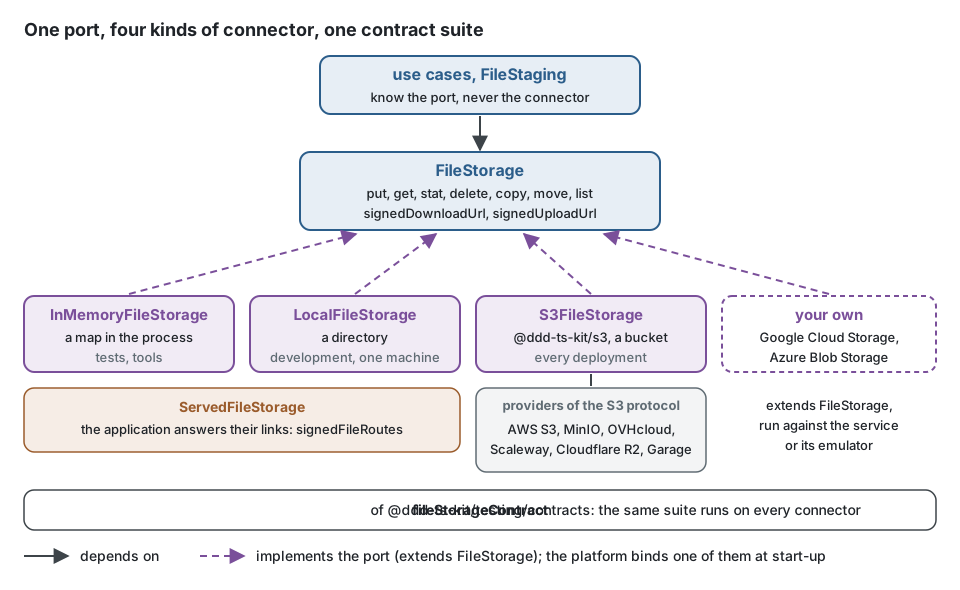
Summary. Files live behind the FileStorage port of the kernel. The kit ships three
connectors held to one contract suite (fileStorageContract of @ddd-ts-kit/testing/contracts):
the memory of the process for the tests, a local directory for development, and an S3-compatible
bucket (@ddd-ts-kit/s3, on the official AWS SDK v3) for a deployment, which covers AWS S3,
MinIO, OVHcloud, Scaleway, Cloudflare R2 and Garage. Google Cloud Storage and Azure Blob
Storage are reached by writing an adapter that passes the same suite. Pick the S3 connector
for anything deployed; keep the directory for one developer's machine.
The connectors
Section titled “The connectors”The use cases know one port, FileStorage; the platform binds one connector at start-up, and
one contract suite holds every connector to the same behaviour. Changing the connector changes
no row either: the aggregate keeps a StoredFile (key, size, media type, checksum), which names
no provider, no bucket and no URL.
InMemoryFileStorage |
LocalFileStorage |
S3FileStorage (@ddd-ts-kit/s3) |
|
|---|---|---|---|
| For | the tests, the tools | development, one machine | every deployment |
| Where the content is | a map in the process | a directory, metadata in .metadata/ |
a bucket, under an optional prefix |
| Streaming | in, then held in memory | in and out, a write renamed into place | multipart upload of 8 MiB parts, one in memory; a stream out |
| Signed links | tokens answered by signedFileRoutes |
tokens answered by signedFileRoutes |
presigned by the service |
| Several instances | no | no | yes |
| Checksum kept | yes | yes | answered by put, not kept |
| Copy, move | in memory | file system | CopyObject, 5 GiB per object |
Bound by init |
in the tests and the tools, whatever stack.storage |
stack.storage: local |
stack.storage: s3, MinIO in the compose stack |
The row "Signed links" is the difference that matters most once deployed. The memory and the
directory are served storages (ServedFileStorage): a link they sign points at the
application, which must answer it, so every byte passes through the API. A bucket answers its
own presigned links: the API only signs, without any request to the bucket, and the client
downloads or uploads straight to the store.
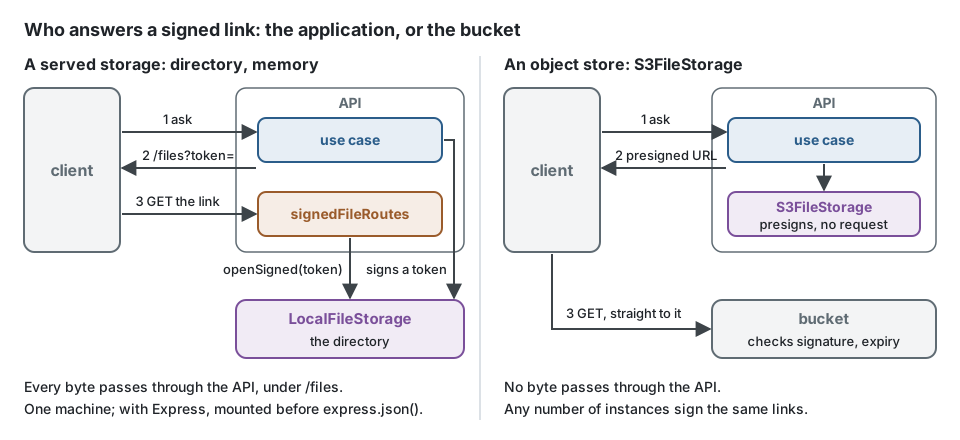
init writes the platform files for the stack it was given; side by side, the two choices and
the routes that answer the links of a served storage:
import { signedFileRoutes, type Route } from '@ddd-ts-kit/http';import { LocalFileStorage, ServedFileStorage, type FileStorage } from '@ddd-ts-kit/kernel';import { S3FileStorage, s3ClientOf, type S3Settings } from '@ddd-ts-kit/s3';
// platform/files/open-files.ts with stack.storage: local (FILES_DIRECTORY, FILES_PUBLIC_URL, FILES_SIGNING_SECRET)export function openDirectory(config: {  readonly directory: string;  readonly publicUrl: string;  readonly signingSecret?: string;}): FileStorage {  const { directory, publicUrl, signingSecret } = config;
  // without a secret one is drawn at each start, and the links die with the process  return new LocalFileStorage({    directory,    baseUrl: publicUrl,    ...(signingSecret === undefined ? {} : { secret: signingSecret }),  });}
// platform/files/open-files.ts with stack.storage: s3 (the S3_* variables)export function openBucket(config: S3Settings & { readonly bucket: string }): FileStorage {  const { bucket, ...settings } = config;
  return new S3FileStorage({ client: s3ClientOf(settings), bucket });}
// platform/files/file-routes.ts: GET and PUT /files?token= for a served storage, nothing for a bucketexport function fileRoutes(storage: FileStorage): readonly Route[] {  return storage instanceof ServedFileStorage ? signedFileRoutes(storage) : [];}
Providers of the S3 protocol
Section titled “Providers of the S3 protocol”| Provider | Endpoint | Notes |
|---|---|---|
| AWS S3 | none | the reference; region of the bucket |
| MinIO | http://localhost:9000 in development |
path-style addressing; the upstream project stopped publishing images in 2025: the kit's pipeline and compose stack run pgsty/minio, built from the same sources, pinned by digest |
| OVHcloud Object Storage | https://s3.<region>.io.cloud.ovh.net |
European hosting |
| Scaleway Object Storage | https://s3.<region>.scw.cloud |
European hosting |
| Cloudflare R2 | https://<account>.r2.cloudflarestorage.com |
region auto; no egress fee |
| Garage | your own | self-hosted, small footprint |
s3ClientOf(settings) builds a client for any of them: path-style addressing with an endpoint,
and checksums only when an operation requires one, since the default of recent SDKs (a
checksum on every request) is refused by several providers that are not AWS and would bind a
signed upload link to an empty body.
Moving from one provider to another changes the environment, not the code. The platform of a
project generated with --storage s3 reads five variables; what changes is the endpoint and the
region (the bucket and its access key are created by the infrastructure code of each):
# AWS S3: no endpoint, the region of the bucketS3_REGION=eu-west-3
# MinIO of the compose stack, in developmentS3_ENDPOINT=http://localhost:9000S3_REGION=us-east-1
# OVHcloud Object Storage, GravelinesS3_ENDPOINT=https://s3.gra.io.cloud.ovh.netS3_REGION=gra
# Scaleway Object Storage, ParisS3_ENDPOINT=https://s3.fr-par.scw.cloudS3_REGION=fr-par
# Cloudflare R2S3_ENDPOINT=https://<account>.r2.cloudflarestorage.comS3_REGION=auto
# and, in every caseS3_BUCKET=acme-filesS3_ACCESS_KEY_ID=...S3_SECRET_ACCESS_KEY=...
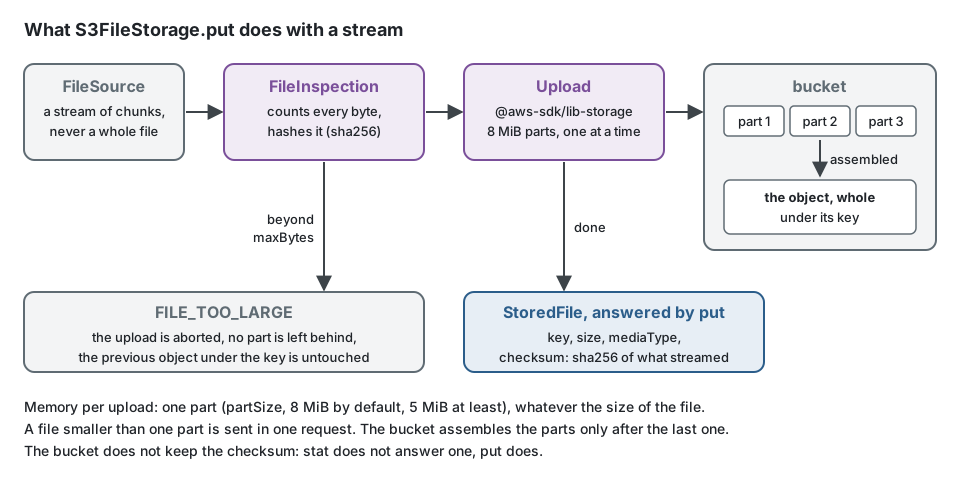
What put does with the content on its way to a bucket: it is counted and hashed as it streams,
sent in parts, and refused beyond its limit without leaving anything behind.
Selection criteria
Section titled “Selection criteria”- More than one instance, or a container that is replaced: an object store. A directory is lost with its machine and is not shared.
- Where the data may live: a provider in the region your obligations name; the bucket, its encryption, versioning and lifecycle are infrastructure code, not application code.
- Egress: files downloaded often cost at a provider that charges for egress; R2 does not.
- Self-hosting: MinIO or Garage, each with its operational load.
What the kit supports and verified
Section titled “What the kit supports and verified”- The contract suite runs on
InMemoryFileStorageandLocalFileStoragein the unit run, and onS3FileStorageagainst a real MinIO server in the integration job of the pipeline (pipeline/github/scripts/start-minio.sh, a service of the GitLab job): round trip with size, media type and checksum, six mebibytes streamed across parts, a write refused beyond its limit that leaves the previous object and no part behind, keys that could leave their place refused, copy, move, listing, signed links that expire, refuse a changed signature or another media type. init --storage local|s3wires the platform:platform/files/binds the ports, registers the hourly purge of staged files, mounts the routes that answer the links of a served storage and the upload reader;generate file-uploadwrites the first upload.- Not verified: the other providers of the table, which speak the same protocol; a provider
whose presigned upload ignores the signed
content-type.
Another provider: Google Cloud Storage, Azure Blob Storage
Section titled “Another provider: Google Cloud Storage, Azure Blob Storage”A connector is a class of the platform (or a package of your own) that extends FileStorage
and passes the contract suite against the real service or its emulator:
// platform/files/gcs-file-storage.ts: put, written as S3FileStorage writes itexport class GcsFileStorage extends FileStorage {  constructor(private readonly bucket: Bucket) {    super();  }
  async put(key: string, content: FileSource, options: PutOptions): Promise<StoredFile> {    const mediaType = mediaTypeOf(options.mediaType);    // counts and hashes the content on its way, and fails with FILE_TOO_LARGE beyond maxBytes    const inspection = new FileInspection(options.maxBytes === undefined ? {} : { maxBytes: options.maxBytes });    const upload = this.bucket.file(assertFileKey(key)).createWriteStream({ contentType: mediaType, resumable: true });
    await pipeline(content, inspection, upload);
    return { key, size: inspection.size, mediaType, checksum: inspection.checksum };  }
// get, stat, delete, copy, move, list, signedDownloadUrl (v4 signed URL), signedUploadUrl (v4, content-type signed)}FileInspection, assertFileKey, assertExpiry, mediaTypeOf and contentDisposition are
exported by @ddd-ts-kit/kernel for connectors: the rules every connector shares are written
once. Then the contract suite runs against the emulator, in the integration specs:
import { beforeEach, describe, expect, it } from 'vitest';import type { FileStorage } from '@ddd-ts-kit/kernel';import { fileStorageContract } from '@ddd-ts-kit/testing/contracts';
// platform/files/gcs-file-storage.ts, the connector abovedeclare const GcsFileStorage: new (bucketName: string) => FileStorage;// a bucket of fake-gcs-server (Azurite for Azure), new for each testdeclare function freshBucket(): string;
// test/integration/gcs-file-storage.contract.spec.tsfileStorageContract(  { describe, it, expect, beforeEach },  {    name: 'GcsFileStorage',    createStorage: () => new GcsFileStorage(freshBucket()),    // the links of a real service expire on its own clock: the suite really waits    elapse: (ms) => new Promise<void>((resolve) => setTimeout(resolve, ms)),  },);
A connector whose links point at the application (a served storage) passes follow: followServed(storage) too, so that the suite follows its links through openSigned and
acceptSigned instead of fetch; the kit runs its memory and directory connectors that way,
with a FixedClock advanced by elapse.
What the suite holds a connector to: a refused write (FILE_TOO_LARGE) leaves nothing new and
keeps the previous content, so write to a temporary object or abort the upload; a missing file
answers undefined on get and stat, and FILE_NOT_FOUND on copy and move; an invalid
key is refused before any request (assertFileKey); links last at most an hour
(assertExpiry); an upload link is bound to its media type; a download link is an attachment,
named or not. Azure signs with a SAS whose
content-type cannot be bound: check the type at FileStaging.confirm, which every direct
upload goes through anyway.
Limits and when not to use it
Section titled “Limits and when not to use it”- No connector makes a write part of a database transaction:
FileStagingorders the work, the purge cleans up. - The local directory and the memory connector answer their links through the application:
with Express, the routes are mounted before
express.json(); behind NestJS, its own body parser reads a JSON file sent through a link first. - Files that must not be deleted for a period (legal retention) need object lock on the bucket, set by the infrastructure code.
- Content delivery to many readers (images of a public site) belongs to a CDN in front of the bucket, not to signed links of the application.
Recommendation by situation
Section titled “Recommendation by situation”| Situation | Choice |
|---|---|
| A new project | init (local directory), then init --force --storage s3 before the first deployment |
| Deployed on AWS | S3FileStorage, no endpoint |
| European hosting required | OVHcloud or Scaleway through S3FileStorage |
| Many downloads | Cloudflare R2 through S3FileStorage |
| Self-hosted | MinIO (pgsty/minio) or Garage through S3FileStorage |
| Google Cloud or Azure only | an adapter of your own held to fileStorageContract |
Sources
Section titled “Sources”- AWS SDK for JavaScript v3,
@aws-sdk/client-s3,@aws-sdk/lib-storage,@aws-sdk/s3-request-presigner: 3.1150.0, checked withnpm viewon 2026-10-12. - MinIO server, image
pgsty/minio:RELEASE.2026-08-04T00-00-00Z(sha256:b6bfe7239bfc83fb90d31612d9704d86039dd714f7904b3f1ad68f211e602372);minio/minioanswered "denied" on Docker Hub and no tag on Quay on 2026-10-12. - busboy 1.6.0, the multipart parser of
@ddd-ts-kit/http/uploads.
See also
Section titled “See also”- File storage: the concept, the consistency order, security.
- Persistence: what does go in the database.
@ddd-ts-kit/s3.