
Quality baseline
Summary. Every project the CLI generates, the example application and the kit itself carry the same small set of tools, each answering one question, each behind one npm script. None is optional and none overlaps another: the type checker does not lint, the linter does not format, the formatter does not lint. This page lists them with their commands; the comparison of the architecture analyzers is in Static analysis and the pipeline.
What each tool answers
Section titled “What each tool answers”| Tool | The question it answers | Script | Settles it |
|---|---|---|---|
TypeScript, strict |
is it sound: does every value have the type the code says | npm run typecheck |
the compiler error |
ESLint with @ddd-ts-kit/eslint-plugin |
is it idiomatic and within the rules: layers, purity, clean code, braces, blank lines | npm run lint |
npm run lint:fix for what is fixable |
| Biome, as a formatter only | is it laid out the one way: line width 120, quotes, commas, line breaks | npm run format:check |
npm run format |
| knip | is anything dead: a file, an export, a dependency nobody uses | npm run deadcode |
removing it |
| dependency-cruiser | does the import graph respect the boundaries, through barrels and re-exports | npm run depcruise |
moving the import |
ddd-ts-kit check |
is the architecture intact: the tree, the names, the glossary, the rules of the reference | npm run check:arch |
the fix sentence of each finding |
| the test runner | does it work | npm test, npm run test:e2e |
the code |
| the coverage of the test runner | is there code no spec has ever run, layer by layer | npm run test:coverage |
the missing spec |
npm run verify chains them all, in that order: types, lint, format, every spec with the
coverage thresholds, end-to-end specs, architecture, graph, dead code, generated documents. The
pipeline runs the same scripts under their ci:* names, on GitHub Actions and on GitLab CI.
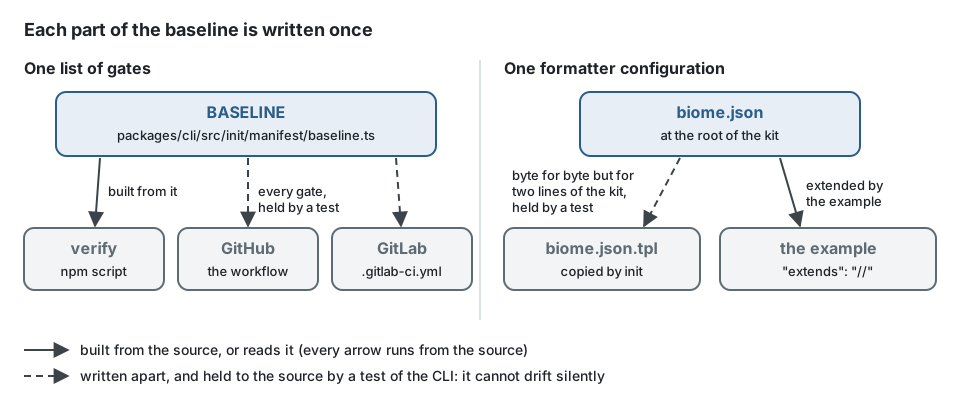
The list is written once, in the CLI (BASELINE, packages/cli/src/init/manifest/baseline.ts):
verify is built from it and a test of the CLI holds the two pipelines, for several stacks and
for the example application, to every gate of it, so a gate cannot leave one place silently.
In a generated project and in the example application, verify is that list, in that order:
{ "scripts": { "verify": "npm run typecheck && npm run lint && npm run format:check && npm run test:coverage && npm run test:e2e && npm run check:arch && npm run depcruise && npm run deadcode && npm run docs:check" }}One file, one question per tool
Section titled “One file, one question per tool”Each tool sees something the others do not. This file of a domain breaks one thing for each of them:
import type { InvoiceRow } from '@/contexts/billing/infrastructure/persistence/billing.schema';
export function totalOf(rows: readonly InvoiceRow[]): number {  const amounts = rows.map((row) => row.amount_in_cents)  if (amounts.length === 0) return 0;  return amounts.reduce((sum, amount) => sum + amount, "0");}
export function formatTotal(totalInCents: number): string { return `${totalInCents / 100} EUR`;}| Tool | What it reports in that file |
|---|---|
| TypeScript | reduce started with a string returns a string, where the function promises a number |
| ESLint | layer/domain-purity: the domain imports a row of infrastructure; clean/braces: the if has no braces; clean/blank-lines: no blank line after the declaration, around the if, before the return |
| Biome | the missing semicolon and the double quotes (npm run format rewrites them) |
| knip | formatTotal is exported and nobody imports it |
| dependency-cruiser | the import from domain/ into infrastructure/, also when it goes through a barrel or a re-export |
ddd-ts-kit check |
the same layer rule, read from the tree and the text of the file, and the rest of the reference (names, glossary) |
| the specs and their coverage | whether totalOf was run at all, and whether the domain of billing stays above its threshold |
The same file once every gate passes:
export interface InvoiceLine {  readonly amountInCents: number;}
export function totalOf(lines: readonly InvoiceLine[]): number {  const amounts = lines.map((line) => line.amountInCents);
  if (amounts.length === 0) {    return 0;  }
  return amounts.reduce((sum, amount) => sum + amount, 0);}
The domain now names its own line instead of a row, and the mapping from the row stays in
infrastructure/.
Where each gate runs
Section titled “Where each gate runs”Read from the files on 2026-10-13. "kit" is this repository, "example" is
examples/scheduling, "project" is what init generates, on every stack. The cheapest gates run
first and on what changed; the wider ones run later, on every file:
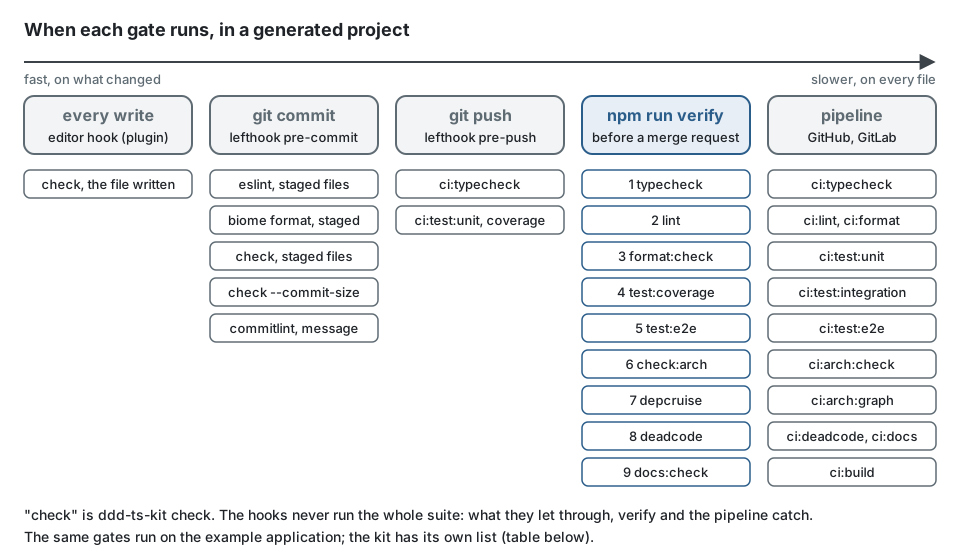
| Gate | verify |
GitHub and GitLab pipeline | Hooks |
|---|---|---|---|
| type check, sources | kit ci:typecheck (the build, then the checked samples of the documentation); example and project typecheck |
kit, example, project: ci:typecheck |
before a push |
| type check, tests | kit typecheck:tests (every package, through ci:typecheck); example and project: tsconfig.json includes test/ and the specs |
same script | before a push |
| lint | kit ci:lint; example and project lint |
ci:lint |
staged files, before a commit |
| format | kit ci:format; example and project format:check |
ci:format, in the lint job |
staged files, before a commit |
| dead code | kit ci:deadcode; example and project deadcode |
ci:deadcode |
no |
| dependency graph | kit depcruise (in ci:arch); example and project depcruise |
kit ci:arch; example and project ci:arch:graph |
no |
| architecture | kit check:self, the fixtures of every rule, and the guard tests (in ci:arch); example and project check:arch |
kit ci:arch; example and project ci:arch:check |
project and example: staged files, before a commit; at every write through the editor hook |
| every rule proven on the example | kit: example:verify runs example:conformance after the example's own gate |
kit: the example job |
no |
| documents drift | kit ci:docs (no em dash or en dash, every French page in step with its English page); example and project docs:check |
ci:docs |
kit: the dash check (check:dashes), before a commit |
| unit specs | kit ci:test:unit; example and project test:coverage |
ci:test:unit |
before a push |
| integration specs | kit: the pipeline only (they need servers); example and project test:coverage (PostgreSQL in process) |
ci:test:integration |
no |
| end-to-end specs | kit: the pipeline only (ci:test:e2e, every stack generated and run); example and project test:e2e |
ci:test:e2e |
no |
| coverage thresholds | kit: a floor per package in vitest.config.ts, in ci:test:unit; example and project: per context and layer, from ddd-ts-kit.config.json, in test:coverage |
ci:test:unit and, for the example and a project, ci:test:integration |
before a push (the unit run) |
| packages as published | kit ci:build (publint, Are the Types Wrong) |
kit ci:build; example and project ci:build (the production build) |
no |
Without an HTTP boundary a project has no end-to-end script and its pipeline job says so; under jest the adapter specs run with the unit specs. The hooks never run coverage before a commit.
Coverage
Section titled “Coverage”The thresholds are a setting of the project, not of the test runner: the coverage key of
ddd-ts-kit.config.json, per layer, with the reference as default, applied to each context
(CONFIG.md). The runner config reads it; lowering a rate is
a recorded deviation; test/coverage-governed refuses an exclusion written beside it. What a
rate proves and what it does not: Testing strategy.
The kit holds itself to a floor per package, the level measured when the floor was written.
The formatter
Section titled “The formatter”Biome is used for one thing: biome.json, written by ddd-ts-kit init, enables its formatter
and switches its linter and its import organiser off. ESLint stays the only linter, and no
import is ever reordered by a tool. The settings are the same in the kit, in the example and
in every generated project: line width 120, two spaces, LF, single quotes, trailing commas,
semicolons, parentheses around the parameter of an arrow function.
- Formatted:
.ts,.mts,.cts,.js,.mjs,.cjs,.json,.jsonc. - Not formatted: Markdown (a formatter would rewrap tables and prose) and YAML.
- Left out in
biome.json: build outputs (dist,coverage,reports), the lockfile, agenerateddirectory, the snapshots of the migrations (migrations/meta), and the artifacts their own check compares byte for byte (openapi/*.jsonandasyncapi.jsonunderopenapi.format: json, the forms ofopenapi/forms/,.dependency-cruiser.cjs); the YAML contracts are not formatted anyway. Two more lines appear only where they apply: the sources of a generated client (clients/*/src), whichddd-ts-kit sdkadds to a project that asks for clients, and, in the kit alone, the compiled samples of its documentation (.ddd-ts-kit).
What the CLI writes is already formatted: npm run format:check passes right after init and
after every generate, and the end-to-end suite of the CLI holds that for every stack it
builds. The generator has no formatter of its own: the templates are written the way the
formatter prints them, with layouts that do not depend on the length of a name where that is
possible, so a very long name can still leave one line for npm run format to wrap.
ESLint and the formatter never fight, because they decide different things. The presets of the
plugin enable no rule about where a token goes; they keep the two things a formatter does not
decide: the blank lines between statements (clean/blank-lines) and the braces of a branch
(clean/braces). Run in either order, the second tool finds nothing to change.
// instead of: the formatter keeps both lines as they are, since neither breaks its layoutif (wrapped.has(repository)) return repository;const next = steps.shift();
// write: lint --fix adds the braces and the blank line, then the formatter breaks the blockif (wrapped.has(repository)) {  return repository;}
const next = steps.shift();
One configuration, three places
Section titled “One configuration, three places”biome.json at the root of the kit is the source. The template the CLI copies into a project
is compared with it byte for byte by a test of the CLI, but for the two lines a new project
does not need: the one that leaves out the generated client of the example (ddd-ts-kit sdk
adds it to a project that asks for clients) and the one that leaves out the compiled doc samples
of the kit. The example application extends it instead of copying it, so the three cannot drift
(the right half of the drawing at the top of this page):
{ "$schema": "https://biomejs.dev/schemas/2.5.15/schema.json", "root": false, "extends": "//"}