
The French documentation
Summary. Every page a reader of ddd-ts-kit opens exists in English and in French. The English page is the source; its French sibling translates all of it and records which version of the English page it translates, so that a script can tell when the translation is behind. This page is for contributors: what is translated, the shape of a French page, the commands, what to do when an English page changes, the glossary that keeps the vocabulary consistent, the style of the diagrams and the convention of the code samples the pipeline compiles.
What is translated
Section titled “What is translated”Every Markdown page of the repository has a French sibling in the same directory, named after
it: README.md and README.fr.md, docs/concepts/aggregates.md and
docs/concepts/aggregates.fr.md. Left out:
| Left out | Why |
|---|---|
*.fr.md |
they are the translations |
every CHANGELOG.md |
release notes, written once in English |
every AGENTS.md and CLAUDE.md, anything under .agents/, .claude/, .codex/ and plugin/ |
instructions for coding agents, read by agents |
every CONTEXT.md |
partly generated by ddd-ts-kit docs |
anything under .github/, .gitlab/, pipeline/, node_modules/ |
tooling, and copies made for generated projects |
anything under packages/cli/templates/ |
the files ddd-ts-kit init and generate write into a project |
anything under site/ |
the documentation website, which copies these pages at each of its builds |
examples/scheduling/clients/api/README.md, examples/scheduling/docs/integration/event-catalog.md |
generated |
The list lives at the top of
pipeline/monorepo/translations.mjs: a page is in
scope when that script says so.
Code, commit messages, the help of the CLI, the messages of the checker and the rule ids stay
in English. The generated reference of Which command, when is the help of
the CLI: its French page holds the same English reference between the same markers, written by
node pipeline/monorepo/commands-guide.mjs.
The shape of a French page
Section titled “The shape of a French page”The first line of an English page in scope is its language switcher, then a blank line:
**English** · [Français](aggregates.fr.md)
# Aggregates
The French page starts with its own switcher, then a line that says which version of the English page it translates, then a blank line:
[English](aggregates.md) · **Français**<!-- translation-of: aggregates.md sha256:3f2a9c0d41b7e865 -->
# Agrégats
The dot between the two links is the middle dot (U+00B7). The hash is the first 16 hex digits
of the sha256 of the English file, its switcher line left out. Never compute it by hand:
--stamp writes it.
A French page translates all of its English page: the same sections in the same order, the same tables, the same lists, the same diagrams at the same places, the same code. In code blocks, only the comments are translated; identifiers, commands, configuration keys, rule ids, file paths and error codes stay as they are, in code blocks and in the prose.
Links. A link to another page in scope points to its French sibling (aggregates.fr.md,
not aggregates.md). A link to code, to a file that is not a page, or to an external site
stays. A link to a heading of a French page uses the slug GitHub gives the French heading:
lower case, accents kept, punctuation removed, spaces as hyphens (## Règles de l'agrégat
becomes #règles-de-lagrégat).
The commands
Section titled “The commands”| Command | What it does |
|---|---|
node pipeline/monorepo/translations.mjs --check |
every problem of the French documentation, one line each, exit 1 if any: a page without switcher, a missing or stale French page, a link that leads nowhere, an anchor no heading has, a French page that links to an English page whose French sibling exists, a diagram without its French drawing, a malformed diagram. npm run docs:translations runs it, and the docs job of the CI too |
node pipeline/monorepo/translations.mjs --check <pages...> |
the same, for these pages only (English or French paths) and the diagrams they show |
node pipeline/monorepo/translations.mjs --stamp <english page> |
writes or refreshes the switcher and the translation-of line of the French page; it creates nothing else |
node pipeline/monorepo/translations.mjs --stale |
the French pages whose English page changed since they were stamped |
node pipeline/monorepo/translations.mjs --add-switchers |
puts the switcher on the first line of every English page in scope that lacks it; idempotent |
node pipeline/monorepo/doc-samples.mjs --check [pages...] |
compiles the checked samples of these pages (of every page in scope and its French page without argument): see Checked samples. Needs npm run build first. npm run docs:samples runs it, and ci:typecheck too |
node pipeline/monorepo/commands-guide.mjs |
writes the generated reference of docs/guides/commands.md and docs/guides/commands.fr.md from the help of the built CLI; --check says when one is stale |
When an English page changes
Section titled “When an English page changes”The English page is the source. Whoever changes it keeps its French page in step, in the same pull request:
- change the English page;
node pipeline/monorepo/translations.mjs --stalelists the French pages that are now behind;- bring each one up to date: translate what changed, nothing more;
node pipeline/monorepo/translations.mjs --stamp <english page>records the new version;node pipeline/monorepo/translations.mjs --check <english page>answers nothing.
Stamping a French page that was not updated hides the gap: stamp only what was translated. A
new English page comes with its French page and its switcher (--add-switchers writes it).
Writing the French
Section titled “Writing the French”- Correct French, with every accent and diacritic: é, è, ê, à, â, ç, î, ô, û, ù, œ. A page written without accents is not finished.
- No em dash and no en dash, in any language: write a colon, a comma, parentheses, or a hyphen
between spaces.
npm run check:dashesrefuses them everywhere. - Typographic quotes « » are welcome in prose; code keeps straight quotes.
- A space before
:and;, as French typography wants; a plain space is enough. - The vocabulary of the glossary, everywhere. The first occurrence of a term in a page may give the English term in parentheses: « contexte délimité (bounded context) ».
- The headings are translated; the
**Summary.**lead of a page becomes**Résumé.**, and a## See alsosection## Voir aussi. - Address the reader as « vous ». Short sentences, active voice, as in the English pages.
Glossary
Section titled “Glossary”The French term to use for each English term of the documentation. A term written in italics in the French column is kept in English, because French developers say it that way.
Strategic design
Section titled “Strategic design”| English | French |
|---|---|
| domain | domaine |
| subdomain (core, supporting, generic) | sous-domaine (cœur, de soutien, générique) |
| bounded context | contexte délimité (bounded context) |
| ubiquitous language | langage omniprésent (ubiquitous language) |
| glossary | glossaire |
| context map | carte des contextes |
| upstream, downstream | amont, aval |
| relationship pattern | patron de relation |
| customer-supplier | client-fournisseur |
| conformist | conformiste |
| anti-corruption layer | couche anticorruption |
| open host service | service hôte ouvert (open host service) |
| published language | langage publié |
| shared kernel | noyau partagé |
| statement of needs | expression des besoins |
| domain discovery, event storming | découverte du domaine, event storming |
| modular monolith | monolithe modulaire |
| microservice, extraction | microservice, extraction |
Tactical design
Section titled “Tactical design”| English | French |
|---|---|
| aggregate | agrégat |
| aggregate root | racine d'agrégat |
| entity | entité |
| value object | objet-valeur |
| domain event | événement du domaine |
| integration event | événement d'intégration |
| domain service | service du domaine |
| domain error | erreur du domaine |
| refusal | refus |
| invariant | invariant |
| specification | spécification |
| factory | fabrique (factory) |
| repository | repository (never « dépôt », which is the git repository) |
| state machine | machine à états |
| state, transition | état, transition |
| guard (of a transition, of a route) | garde |
| event sourcing | event sourcing |
| upcaster | upcaster |
| snapshot | snapshot |
| anemic model | modèle anémique |
Application and architecture
Section titled “Application and architecture”| English | French |
|---|---|
| layer | couche |
| dependency rule | règle de dépendance |
| presentation, application, domain, infrastructure | présentation, application, domaine, infrastructure |
| platform | plateforme |
| command | commande |
| query | requête |
| request (HTTP) | requête HTTP: always qualified, to tell it from a query |
| response | réponse |
| handler | gestionnaire (handler) |
| use case | cas d'usage |
| command bus, query bus, event bus | bus de commandes, bus de requêtes, bus d'événements |
| middleware | middleware |
| port | port |
| adapter | adaptateur |
| gateway | gateway |
| mapper | mapper |
| composition root | racine de composition |
| dependency injection, container | injection de dépendances, conteneur |
| injection token | jeton d'injection |
| binding, to bind | liaison, lier |
| wiring | câblage |
| declaration, decorator | déclaration, décorateur |
| controller | contrôleur |
| route, route group | route, groupe de routes |
| endpoint | point d'accès (endpoint) |
| DTO, schema, validation | DTO, schéma, validation |
| problem document | document problem (RFC 9457) |
| policy (of authorization) | politique (policy) |
| permission, role | permission, rôle |
| actor, system actor | acteur, acteur système |
| execution scope | portée d'exécution |
| access scope | périmètre d'accès |
| tenant | tenant |
| multitenancy, multitenant | multitenance, multitenant |
| elevation | élévation |
| CQRS, read side, write side | CQRS, côté lecture, côté écriture |
| read model | modèle de lecture |
| projection, projector | projection, projecteur |
| criteria | critères (Criteria) |
| hydration | hydratation |
| page, cursor | page, curseur |
Messaging, consistency and jobs
Section titled “Messaging, consistency and jobs”| English | French |
|---|---|
| transactional outbox | outbox transactionnelle |
| relay | relais |
| unit of work | unité de travail |
| commit, rollback | validation (commit), annulation (rollback) |
| producer, consumer | producteur, consommateur |
| publisher, subscriber | publisher, abonné |
| broker, queue | broker, file d'attente |
| dead letter | file de rejet (dead letter) |
| at-least-once, at-most-once, exactly-once | au moins une fois, au plus une fois, exactement une fois |
| idempotent, idempotency | idempotent, idempotence |
| eventual consistency, strong consistency | cohérence à terme, cohérence forte |
| dual write | double écriture |
| event versioning, breaking change | versionnement des événements, changement cassant |
| saga, process manager | saga, gestionnaire de processus |
| compensation | compensation |
| worker | worker |
| job, scheduled job, background job | job, job planifié, job en arrière-plan |
| lease, checkpoint | bail, point de reprise |
| lock | verrou |
| overlap, missed occurrence | chevauchement, occurrence manquée |
| scheduler | planificateur |
| claim (of outbox entries) | réclamation, réclamer |
| acknowledgement, poison message | accusé de réception, message empoisonné |
| backoff, jitter | backoff, gigue (jitter) |
| fencing token | jeton de clôture (fencing token) |
Cross-cutting concerns
Section titled “Cross-cutting concerns”| English | French |
|---|---|
| audit trail | journal d'audit |
| observability, tracing, span | observabilité, traçage, span |
| log, logger | journal, logger |
| metrics | métriques |
| error reporting | remontée des erreurs |
| correlation id | identifiant de corrélation |
| resilience | résilience |
| retry, timeout | nouvelle tentative (retry), délai d'expiration (timeout) |
| circuit breaker, bulkhead | disjoncteur (circuit breaker), cloison (bulkhead) |
| aspect, advice, advised call | aspect, advice, appel intercepté (advised call) |
| cache, HTTP cache, purge | cache, cache HTTP, purge |
| cache miss, rate limiter | défaut de cache, limiteur de débit |
| flush, redaction | vidage (flush), masquage |
| file storage, signed link | stockage de fichiers, lien signé |
| identity provider, token, claim | fournisseur d'identité, jeton, claim |
| impersonation | emprunt d'identité (impersonation) |
| authorizer | autorisateur |
| RBAC, ABAC, ReBAC | contrôle d'accès par rôles (RBAC), par attributs (ABAC), par relations (ReBAC) |
Tools, tests and workflow
Section titled “Tools, tests and workflow”| English | French |
|---|---|
checker (the tool behind ddd-ts-kit check) |
checker |
| rule, rule id | règle, identifiant de règle |
| finding, violation | constat, violation |
| severity | sévérité |
| fix (of a finding) | correction |
| deviation, decision record (ADR) | dérogation, enregistrement de décision (ADR) |
| suppression (of a lint rule) | désactivation |
| pipeline, gate | pipeline, porte |
| quality gate | porte de qualité |
| dead code, import graph | code mort, graphe des imports |
| generator, template | générateur, template |
| scaffold (verb) | générer |
stack (the choices of init) |
stack |
preset (--preset, a context written whole) |
preset (a worked example of a configuration stays « préréglage ») |
| spec, fake, builder | spec, fake (double de test), builder |
| mock, stub, spy | mock, stub, spy |
| contract suite | suite de contrat |
| fixture | fixture |
| unit, integration, end-to-end test | test unitaire, d'intégration, de bout en bout |
| coverage | couverture |
| given, when, then | étant donné, quand, alors |
| vertical slice | tranche verticale |
| conductor, briefing | chef d'orchestre, consigne |
| worktree | worktree |
| skill, agent, hook, plugin | skill, agent, hook, plugin |
| package, workspace | package, workspace |
| repository (git) | dépôt |
| commit, branch, pull request | commit, branche, pull request |
| release | version publiée (release) |
| deployment | déploiement |
A term that is missing here is added here, in the same pull request as the page that needs it, in the English and the French version of this page.
Diagrams
Section titled “Diagrams”A diagram earns its place when it shows a structure or a flow that a paragraph describes poorly: layers, a sequence of calls, a lifecycle, who depends on whom. Every diagram is drawn twice, with English and with French labels, and both drawings are the same picture.
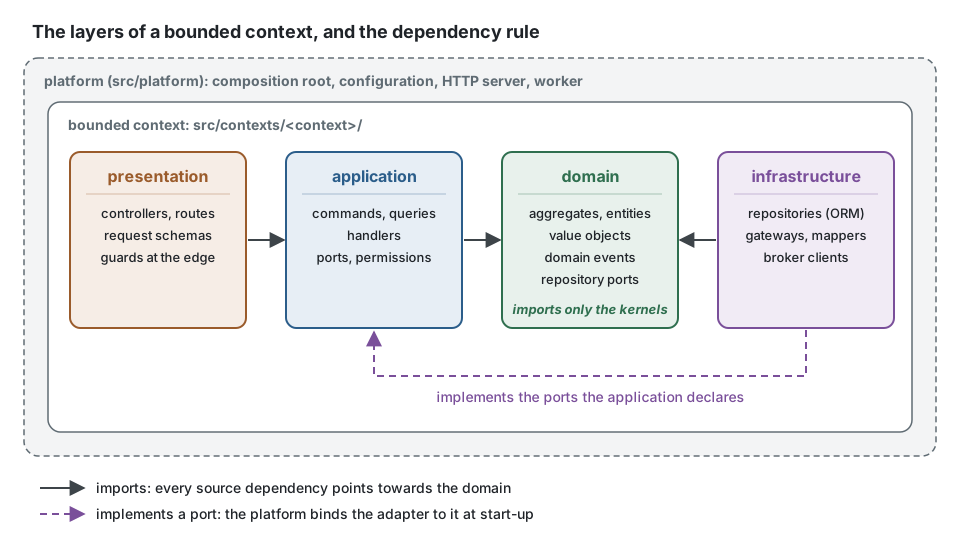
This is the reference drawing: copy its style.
Files and references
Section titled “Files and references”| English drawing | docs/assets/diagrams/<page-slug>-<what>.svg |
| French drawing | docs/assets/diagrams/<page-slug>-<what>.fr.svg, the same drawing with French labels |
From a page under docs/ |
a relative path:  |
From a page outside docs/ (package READMEs, examples, the root README) |
the absolute URL, so that npm renders it too: 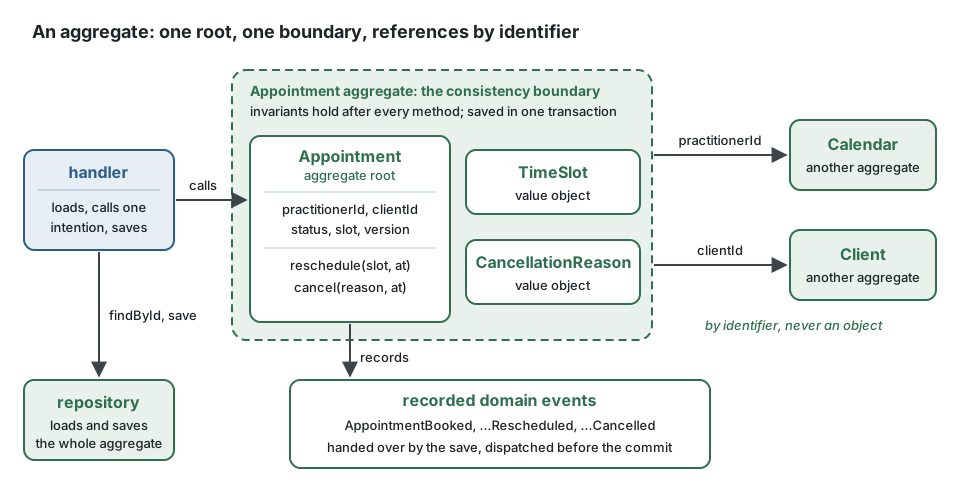 |
The alt text says what the diagram shows, in the language of the page. The French page shows
the .fr.svg drawing at the place where the English page shows the .svg one; --check
holds it.
- Hand-written SVG, self-contained: no script, no external reference, no embedded raster, no
web font. Text is real
<text>elements, never paths. - A
viewBox, a width of at most 960, a white rounded background rectangle as the first shape, so that a diagram reads the same on a dark page. - A
<title>and a<desc>: what the diagram shows, in the language of its labels. - Text of at least 13px: 13 or 14 for labels, 16 for the name of a box, 18 for a heading.
font-family="system-ui, -apple-system, 'Segoe UI', Roboto, sans-serif"on the root element.- Arrows are lines or paths with a marker. A solid arrow is a dependency or a call, a dashed arrow an implementation or an asynchronous message; a legend says which when both appear.
- No arrow crosses a box or another arrow; route it around.
- One accent color per kind of thing, the same in every diagram: a light tint of the color as
the fill of a box, the color itself for its border and its name,
#1f2328for other text.
| Kind of thing | Color | Tint |
|---|---|---|
| domain | #2f6f4f |
#e8f1ec |
| application | #2b5d8a |
#e7eef5 |
| infrastructure | #7a4f9a |
#f1ebf5 |
| presentation | #9a5b2b |
#f6ede6 |
| platform, external system | #5f6b73 |
#f3f4f5 |
| arrows, neutral | #3d4449 |
A skeleton to copy
Section titled “A skeleton to copy”<svg xmlns="http://www.w3.org/2000/svg" viewBox="0 0 640 240" width="640" height="240" role="img" aria-labelledby="title desc" font-family="system-ui, -apple-system, 'Segoe UI', Roboto, sans-serif"> <title id="title">A handler depends on a port of the domain</title> <desc id="desc">The handler of the application calls the repository port of the domain.</desc> <defs> <marker id="arrow" viewBox="0 0 10 10" refX="9" refY="5" markerWidth="8" markerHeight="8" orient="auto-start-reverse"> <path d="M0,0 L10,5 L0,10 z" fill="#3d4449"/> </marker> </defs> <rect width="640" height="240" rx="16" fill="#ffffff"/> <rect x="40" y="80" width="200" height="80" rx="10" fill="#e7eef5" stroke="#2b5d8a" stroke-width="2"/> <text x="140" y="126" font-size="16" font-weight="700" fill="#2b5d8a" text-anchor="middle">handler</text> <rect x="400" y="80" width="200" height="80" rx="10" fill="#e8f1ec" stroke="#2f6f4f" stroke-width="2"/> <text x="500" y="126" font-size="16" font-weight="700" fill="#2f6f4f" text-anchor="middle">repository port</text> <line x1="244" y1="120" x2="396" y2="120" stroke="#3d4449" stroke-width="2" marker-end="url(#arrow)"/> <text x="320" y="108" font-size="13" fill="#1f2328" text-anchor="middle">depends on</text></svg>Validate it, then look at it
Section titled “Validate it, then look at it”xmllint --noout docs/assets/diagrams/<file>.svgnode pipeline/monorepo/translations.mjs --check docs/assets/diagrams/<file>.svggoogle-chrome --headless=new --disable-gpu --no-sandbox --hide-scrollbars \ --screenshot=/tmp/diagram.png --window-size=1000,<height> file://$PWD/docs/assets/diagrams/<file>.svgOpen the PNG and look at it before committing: overlapping or clipped text, an arrow that
crosses a box, a label longer than its box (French labels are often longer: check both
drawings). convert <file>.svg <file>.png (ImageMagick) gives a quick preview, but it draws
no arrow heads: the browser is the reference.
Checked samples
Section titled “Checked samples”A TypeScript block that shows how to use the kit is a promise: a reader copies it. When it is
preceded by the line <!-- checked sample -->, the pipeline compiles it against the packages
of the workspace, so it cannot drift from the API:
<!-- checked sample -->```tsimport { ConceptError } from '@ddd-ts-kit/kernel';
export class InvoiceError extends ConceptError {  static alreadyPaid(invoiceId: string) {    return InvoiceError.refusal('INVOICE_ALREADY_PAID', `Invoice ${invoiceId} is already paid.`, { invoiceId });  }}```
which renders as:
import { ConceptError } from '@ddd-ts-kit/kernel';
export class InvoiceError extends ConceptError {  static alreadyPaid(invoiceId: string) {    return InvoiceError.refusal('INVOICE_ALREADY_PAID', `Invoice ${invoiceId} is already paid.`, { invoiceId });  }}
The rules of a checked sample:
- It compiles alone, as a module: it imports what it uses from
@ddd-ts-kit/*(or from a library installed in the workspace), and declares the small types and values it needs (declare const clock: Clock;,interface OrderRow { ... }). No@/alias: it resolves in a project, not here. - It is compiled strict, as
tsconfig.base.jsonsays (strict,noUncheckedIndexedAccess,exactOptionalPropertyTypes,verbatimModuleSyntax: a type is imported withtype), with the standard decorators of TypeScript. A sample written for the legacy decorators is preceded by<!-- checked sample: legacy-decorators -->instead. - Never invent an API: read the source of the package and its tests first.
- The French page carries the same samples, comments translated, and they are checked too.
- A short fragment that cannot compile alone (one line of configuration, a method out of its class) stays unmarked.
npm run buildnode pipeline/monorepo/doc-samples.mjs --check docs/concepts/aggregates.md docs/concepts/aggregates.fr.mdEach failure prints the page and the line the error is on, then the message of the compiler.
The modules are written under .ddd-ts-kit/doc-samples/, which git ignores.